Viewing Running Applications
You can view the user and system application's status on the Applications page. To open this page, click Applications from the sidebar.
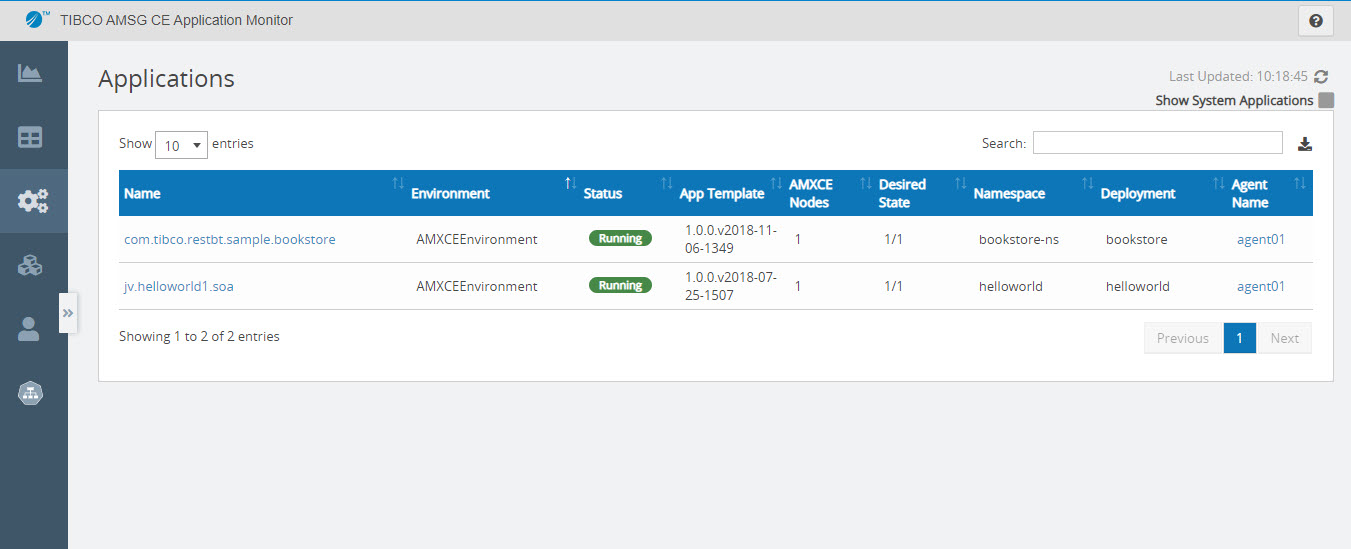
The Applications page displays the following information:
| Field | Description |
|---|---|
| Name | Name of the application. |
| Environment | ActiveMatrix Service Grid - Container Edition environment name in which the application is running. |
| Status |
Specifies the status of the application. Possible values:
The runtime state is a rollup value for all the application's components and bindings. Partial states mean that some of an application's components and bindings are in a different state than others. |
| App Template |
The version of the application template from which the application was created. |
| AMXCE Nodes | Number of AMXCE nodes on which the application is running. |
| Desired State | Displays readiness state for the applications as ready/total replicas. This field is not applicable for system applications. |
| Namespace | Name of namespace in which application pods are deployed. |
| Deployment | Deployment name specified in the Kubernetes deployment file. |
| Agent Name | Name of the agent. You can click the agent name to view its details. |
To View System Applications
By default, only user applications are displayed on the Applications page. To view the following system applications, select the Show System Applications check box in the upper-right corner of the Applications page:
com.tibco.amx.platformcom.tibco.amxce.platform.monitorcom.tibco.amx.it.mediation.apt-
GovernanceControlDistribution(Displayed only when Policy sets are used in applications)
Exporting JSON File
To export the list of applications as a JSON file, click Export JSON in the upper-right corner. The name of the file gets downloaded is
 AllApplications_Json_<date_time_stamp>.json.