Using the Purge Process CLI
By default, all process instances that are completed, cancelled or failed are automatically purged from TIBCO ActiveMatrix BPM. However, If you want to keep completed process instances for a period of time - for example, for auditing purposes - you can configure process templates in the Openspace Process Views gadget so that they are not automatically purged. For more information, see the "Purging Process Instances" section in TIBCO® BPM Enterprise Openspace User Guide.
The Purge Process CLI (Command-Line Interface) is a utility that can be used, either interactively or via scripting, to remotely purge completed, cancelled or failed process instances that have not been automatically purged.
The Purge Process CLI is exposed from the BPM system using a Secure Shell (SSH).
Enabling the Purge Process CLI
By default, the Purge Process CLI is disabled. (After an upgrade, the Purge Process CLI is disabled, even if it was enabled on the previous version of the ActiveMatrix BPM system.) You can enable it by using the "ActiveMatrix BPM: Purge Process CLI Configuration" option in the TIBCO Configuration Tool "Edit TIBCO ActiveMatrix BPM Instance" wizard.
You can also use the wizard to specify the BPM node, IP address and port number on which the Purge Process CLI will be available.
See TIBCO ActiveMatrix BPM Installation and Configuration for more information.
- Openspace - see "Purging Process Instances" in the TIBCO® BPM EnterpriseOpenspace User Guide.
- the ActiveMatrix BPM public API - see the "ProcessManagerService" section in TIBCO® BPM Enterprise Developer Guide.
Connecting to the Purge Process CLI
To access the Purge Process CLI:
- Use a Secure Shell (SSH) client to connect to the the BPM node and port used by the Purge Process CLI. For example:
ssh tibco-admin@127.0.0.1 -p portNumberNote: The ActiveMatrix BPM system maintains an SSH host key which is used to negotiate and encrypt the connection. See Managing the SSH Host Key Used by the Purge Process CLI. - When prompted, log in using the credentials of a BPM user who has the
purgeProcessInstancessystem action.
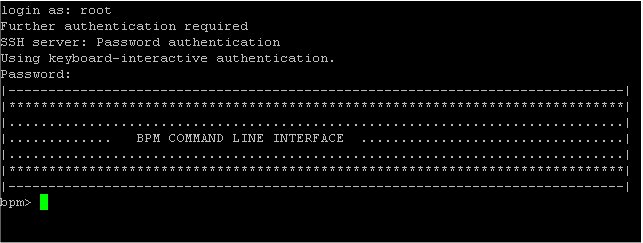
After authentication, a command prompt is displayed.
Purge Process CLI Commands
You can now use the commands listed in the following table to perform purge operations.
| Cmd | Command | Description |
|---|---|---|
help
|
help
|
Display the available commands. |
ppbs
|
purge-processes-by-status
|
Purge terminated process instances based on their status.
Valid States are: COMPLETED, CANCELLED or FAULTED). For example,
|
ppbd
|
purge-processes-by-duration
|
Purge terminated process instances based on their duration.
Duration should be specified using ISO 8601 duration format. For example, the command
|
pps
|
purge-processes-status
|
Check the status of the purge job. |
spp
|
stop-purge-process
|
Stop the purge job. |
exit
|
exit
|
Exit from the Purge Process CLI and close the SSH. |