Typical Flow of Events
This topic describes the typical flow of events when a user opens a work item from the work list displayed in the browser of the client application.
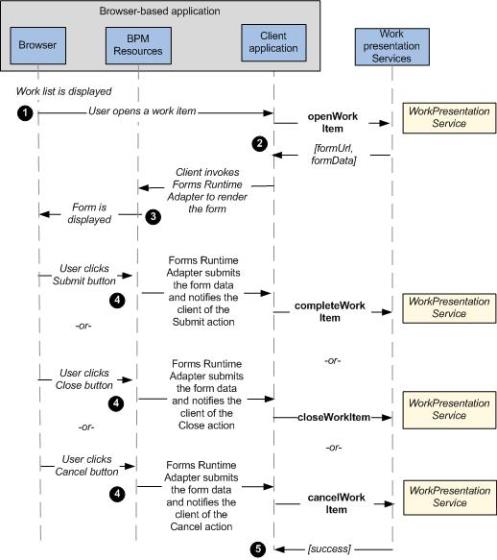
The details of the events are as follows:
- To open a work item, the client application invokes the BPM WorkPresentationService via a Java service connector. The
openWorkItem()operation is used to open the work item. - In response to the
openWorkItem()request, theformUrlandformDataare returned to the client application. The client application decides thelocalefor rendering the form and provides the identifier of the DOM node under which the form will be rendered. ThechannelIdis the identifier of the presentation channel to which the client application is bound, e.g.GIGWTPull_DefaultChanneloropenspaceGWTPull_DefaultChannel. See Binding the Client Application to a Channelfor more information.The client application invokes the
FormRunner.loadForm()method, which accepts the above values along with two arguments -onSuccessandonError. See com.tibco.forms.client.FormRunner for details of theFormRunner.loadForm()method.The following code snippet shows how the form is loaded using the
FormRunner.loadForm()method.var formURL; // Form URL obtained from the work item. var formData; // The initial form data obtained from the work item. var bomJSPath; // BOM JavaScript root path obtained from the workitem. var locale = "en_US"; // locale to use var parentId; // Identifier of a node to which the form is added. var submitHandler = function(actionName, form) { var formData = form.getSerializedParameters(); // submit the work item form.destroy(); }; var closeHandler = function(actionName, form) { // close the work item form.destroy(); }; var cancelHandler = function(actionName, form) { // cancel the work item form.destroy(); }; var onSuccess = function(form) { form.setActionHandler(com.tibco.forms.client.Form .ACTION_SUBMIT, submitHandler); form.setActionHandler(com.tibco.forms.client.Form .ACTION_CLOSE, closeHandler); form.setActionHandler(com.tibco.forms.client.Form .ACTION_CANCEL, cancelHandler); }; var onError = function(e) { alert("An error occurred while loading the form: "+ e); }; com.tibco.forms.client.FormRunner.loadForm(formURL, formData, bomJSPath, locale, parentId, onSuccess, onError, JSONP);Note: Avoid using thecom.tibco.forms.client.FormRunner.loadForm()method on the pageonLoadevent, as thecom.tibco.forms.client.FormRunnerclass might not be fully loaded and the API methods being used might not be available. To avoid these errors, the client application can define theonTIBCOFormRunnerLoadfunction on the page and can be notified about the availability ofcom.tibco.forms.client.FormRunner. See Injecting the Forms Runtime Adapter in the Browser for further details. - The form is displayed in the browser. The
FormRunner.loadForm()method is asynchronous, so any post-processing that is done on the loaded form object happens within theonSuccesscallback handler. In the above code snippet, three action handlers are set that take care of the submit, close, and cancel operations that are provided on most forms. - When the form is submitted, the
submitHandlerhandles the submit action. In response to form submission,form.getSerializedParameters()method retrieves theformData. See com.tibco.forms.client.Form for details of theform.getSerializedParameters()method. This method returns a JSON (JavaScript Object Notation) serialization of the data within the form. - After successful submission of the form, the client application invokes
completeWorkItem()to pass the form data back to the BPM WorkPresentationService. This operation is used to update the work item.