Method 1: Stopping the BPM Application Before Upgrading It
You can upgrade the BPM system by creating the necessary SQL scripts, stopping the BPM application, manually running the scripts, and then upgrading the application.
- Procedure
- On the
ActiveMatrix BPM Upgrade: Upgrade Configuration screen of the
Upgrade TIBCO ActiveMatrix BPM Instance Wizard:
- Clear Automatically upgrade BPM Database Schema.
- Click
Generate Scripts to create the SQL scripts required to upgrade the database.
TIBCO Configuration Tool writes the required upgrade scripts to the following folder:
CONFIG_HOME\bpm\BPMApplicationName\database
- Click
Next.
The ActiveMatrix BPM Upgrade: Summary screen is displayed.
Warning: Do NOT click Configure at this point! - In ActiveMatrix Administrator:
- Select the BPM application (for example, ), then click Stop.
- In the
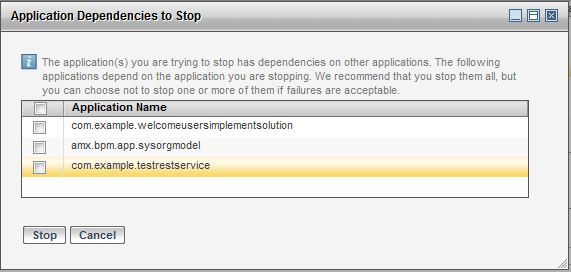
Application Dependencies to Stop dialog, clear
every application that is selected (as shown in the following example), then click
Stop.
- Refresh the display until the BPM application status displays as Stopped.
- Get a database administrator to manually upgrade the BPM database - for more information, see Manually Running BPM Database Upgrade Scripts.
- On the ActiveMatrix BPM Upgrade: Summary screen of the Upgrade TIBCO ActiveMatrix BPM Instance Wizard, click Configure.