Outbound Batching
With TIBCO BusinessConnect Container Edition EDI Protocol powered by Instream X12 protocols, outbound transactions can be sent individually with one outgoing EDI document containing only one transaction enclosed in a single interchange envelope. Outbound transactions can also be batched together into an EDI document that contains multiple interchange envelopes, and each envelope contains multiple transactions of the same type. However, the above batching functionality cannot batch transactions targeting different trading partners into a single EDI document. The outbound batching has this functionality in Gateway protocol. Transactions of different types and targeting different trading partners can be batched together into a single outgoing EDI document. Such EDI documents contain multiple interchange envelopes, and each envelope contains one type of transaction targeting one trading partner.
By providing this batching functionality, the Gateway protocol represents the commercial VANs where batches of transactions are distributed to the target trading partners.
Multiple trading partners can share the same Gateway for batching X12 transactions by specifying the same Gateway name in their batching configuration. The batch EDI document contains multiple interchange envelopes, and each interchange envelope contains a batch of transactions for one trading partner.
A diagram of outbound batching is shown in the figure below.
Figure 30: Outbound Batching
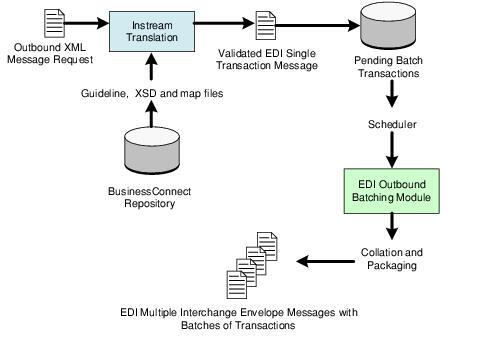
The X12 transaction goes through message validation and conversion from the XML request to the standard EDI format. The messages that are configured to be delivered in batch are persisted into the database after successful message validation and conversion.
You configure a maximum count of messages or a scheduled time interval. When a batch of persisted transactions reaches this count or interval, all the persisted transactions are retrieved back from the database and collated into a single interchange envelope. Each transaction in the resulting EDI document is assigned a unique control number within the interchange envelope before the batch is transmitted to your trading partner. The batch is transmitted using the transport that you have chosen as a default.
The Gateway protocol provides two mechanisms of controlling the batching of X12 transactions at the trading partner level:
-
Maximum number of transactions in each batch. When the cumulated number of transactions reaches the maximum count, the batch is marked for transmission immediately. A new batch will be created for subsequent new outgoing transactions. Regular time interval between the start time and the end time of the scheduling window.
-
Batching times are defined based on the start time in increments of the specified interval until the end time of the scheduling window, all outgoing transactions are cumulated before the next batching time.
-
For example: if the start and end time is from 9:00 AM. to 6:00 PM. with a scheduled time interval of 30 minutes, the batches are scheduled at 9:00 AM., 9:30 AM., 10:00 AM., and so on.
There are also additional options that extend the batching behavior at the transaction level. These options are:
-
Always If the batch scheduler is enabled in the trading partner Scheduled Transmission tab, all transactions of this transaction type for that trading partner will be placed into batches. The batches will be sent based upon the settings in the business agreement Scheduled Transmission tab. See Scheduled Transmission Tab.
-
Never You can configure a transaction type to be excluded from the batching facility so the transaction will always be transmitted directly to your trading partner immediately. For example: All invoices for a particular trading partner are always sent directly as received from the back-end system.
-
Exclusively TIBCO BusinessConnect can organize transactions so that each interchange envelope contains only one type of transaction. For example: All purchase orders for a particular trading partner are always packaged into a single interchange envelope. The exclusive batching feature includes two options in which TIBCO BusinessConnect can transmit:
— Each interchange in its own document — Multiple interchanges in a single document
To learn more about these options, see TIBCO BusinessConnect Container Edition EDI Protocol Powered By Instream, X12 Configuration, Outbound Action Tab.