EDI Guideline Files
Guideline files contain most of the information necessary for the EDI Conversion Engine of TIBCO BusinessConnect EDI Protocol powered by Instream to validate and convert EDI messages.
This section contains a brief introduction to guideline files. See Storing Guidelines and Schemas in the Configuration Store for detailed information on how to develop guideline files.
After a guideline file has been created and the appropriate customization have been applied, the guideline is saved to a file. The default file extension for guideline files is .sef or .std.
Message Guidelines
All of the elements used in a message, for example, segments, composite elements, data elements, code lists, are represented in the guideline file.
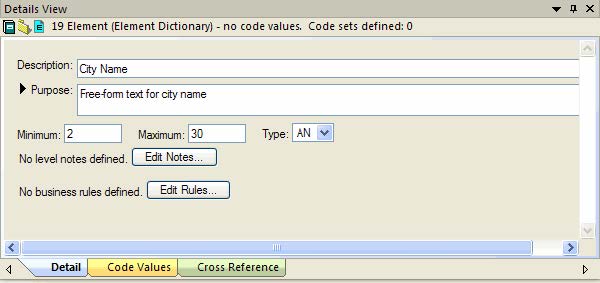
Detailed information about each element is also contained in the guideline. For example, the specification for a data element consists of:
- The data element type and whether it is required or optional to use it
- How many times the element can be repeated
- The minimum and maximum length of the element
Figure 4: Data Element Specification in a Guideline
A guideline is created to encompass the whole message along with the interchange and group envelope segments. TIBCO BusinessConnect EDI Protocol powered by Instream supports customizing these guidelines using the EDISIM Standards Editor and then importing the customized guidelines to the Transaction Leaf node where either the .sef or .std format guidelines can be imported.