Organization Modeler Default Schema
When you create certain components within your Organization Model, the Organization Modeler enables you to allocate standard types to these components. Not all the components within the Organization Modeler have a standard type.
The following table describes the components that have types provided in the default schema, what they are, and what members each of those types contains:
| Component | Standard Type | Unit Members | Position Members |
|---|---|---|---|
| Organization | Public Company | Head Department | |
| Organization Unit | Department Type | Department Business Unit Team | Manager Member |
| Position | Standard Position Type | ||
| Location | Standard Location Type | ||
| Resource | Human Resource Type Consumable Resource Type Durable Resource Type |
When you create an Organization Model, you can decide whether to use the Standard Types provided by the Organization Modeler, create new Types, or create your own Schema, depending on your requirements.
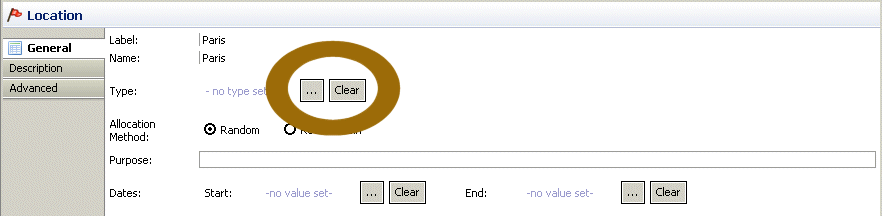
When a component that has a standard type defined for it is created, you can assign the type in the Properties View for the component. By default, no type is assigned, as in the following illustration. You can assign a type by clicking  and selecting either the standard type or any other type that has been defined.
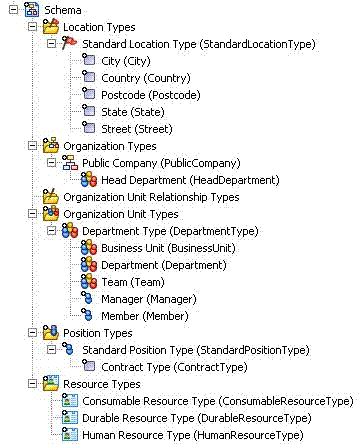
The following diagram shows the default schema as it appears in the Project Explorer, if you chose to apply it when creating the project:
The following diagram shows how the default schema reflects an organizational structure.
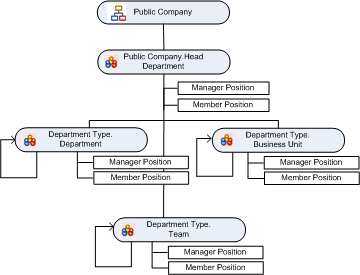
In this diagram:
- Public Company is the delivered Organization type.
- Head Department is an Organization Unit type that is a member of Public Company. This type has a multiplicity defined as 0..1, so there can only be one Head Department.
- Department, Business Unit and Team are the other Organization Unit types delivered. All of these need to be in a hierarchical relationship with another typed organization unit as their parent. The hierarchy does not need to be that shown in the diagram, however; any one of the delivered organization units can be the parent of any other.