Creating Classification Code Hierarchy
Using Classification Code tree controls you can create Classification Code Hierarchy.
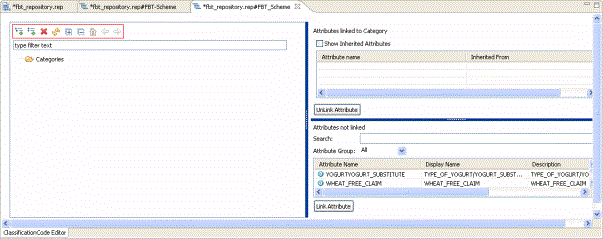
| Tree Controls | |
| Editing Controls | |
|
|
Create a new child Classification Code. |
|
|
Create a new sibling Classification Code. |
|
|
Delete a Classification Code. |
| Navigating Controls | |
|
|
Refresh the Classification Code. |
|
|
Expand to view all the Classification Code. |
|
|
Collapse all the Classification Code. |
|
|
Home Classification Code. If you are inside a child or sibling Classification Code and want to return the main Classification Code. |
|
|
Back Classification Code. If you are inside a child or sibling Classification Code click and want to return back. |
|
|
GoInto Classification Code if you want view the child or sibling Classification Code. |


- Procedure
- Click
 to add a child Classification Code. Enter an appropriate name for the child Classification Code.
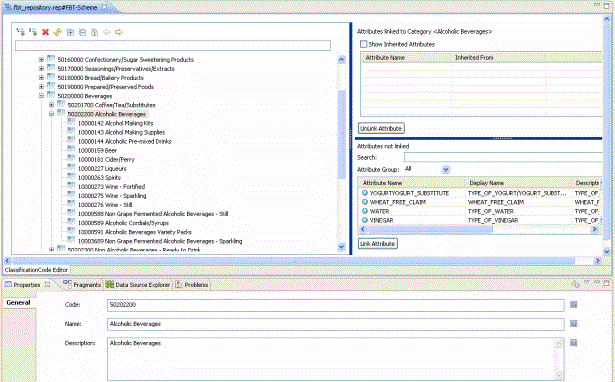
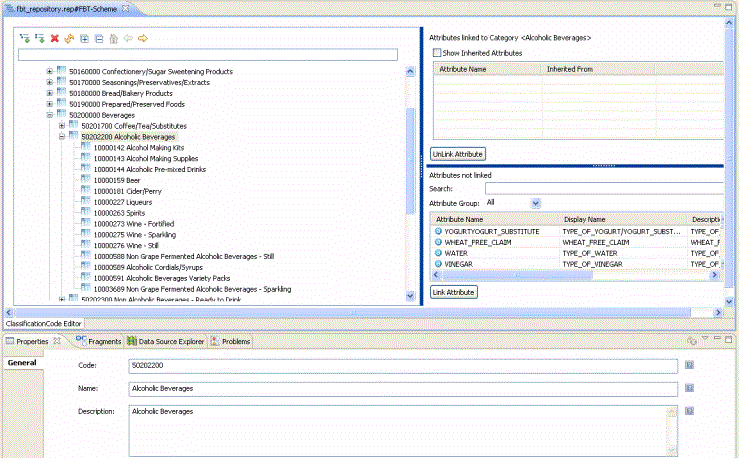
- The properties for child Classification Code are displayed. Enter the Code, Name, and Description in the respective fields. You can add multiple child Classification Code.
- Similarly click
 to add sibling Classification Code. Enter the
Code,
Name, and
Description in the respective fields. You can create multiple siblings of an existing child.
to add sibling Classification Code. Enter the
Code,
Name, and
Description in the respective fields. You can create multiple siblings of an existing child.
- Use the tree controls specified in the control table to Expand, Collapse, GoInto and so on.
- The newly created Classification Code is displayed.