Failures on Linux when the SWT Internal Browser is used
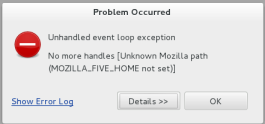
There are failures on Linux Version 7 (OEL7, CentOS 7, RHEL 7) when TIBCO Business Studio - BPM Edition uses the SWT internal browser (used for BPM Live Dev, Email Service Task, TIBCO Product Help view) and an error message is displayed.
You will see the following error:
When you click OK you see the following error message.
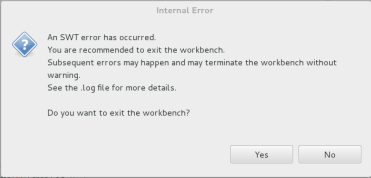
To fix this you must install 64-Bit XULRunner 1.9.2. You need to download this from the Mozilla nightly builds site:
- Extract the contents of the tar file by entering the following command:
tar -xviftar-file-name. -
To make the new XULRunner version available, update the TIBCO Business Studio - BPM Edition.ini file and add the following Java VM arguments (vmargs) in the file:
-Dorg.eclipse.swt.browser.XULRunnerPath=pathto-XULRunner.
Note: This update applies to a specific instance of TIBCO Business Studio - BPM Edition. If the instance of TIBCO Business Studio - BPM Edition was installed for an individual user, the update only applies to that user. If TIBCO Business Studio - BPM Edition was installed as a shared instance that is used by multiple users, the update applies to all users of the shared instance.
The following procedure makes the new version available to all users on the system:
- As user root, extract the XULRunner runtime directory to a location that is accessible to all users, for example, /usr/lib/xulrunner-1.9.2.
- From the XULRunner directory, enter the following command:
./xulrunner --register-global
The following procedure makes the new version available to an individual user.
- Extract the XULRunner runtime directory to the home directory of the user.
- From the XULRunner directory, enter the following command:
./xulrunner --register-user.Note: Registering XULRunner persists across the system and TIBCO Business Studio - BPM Edition restarts.
- Restart TIBCO Business Studio - BPM Edition and confirm that the issues have been resolved.