Applying a UML Profile to a Business Object Model
You can apply a UML profile to a Business Object Model.
- Procedure
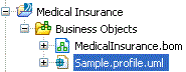
- To use an existing UML profile, copy the file that contains the UML profile to your
Business Objects folder in the Project Explorer. The UML profile is displayed as follows:
- Select the Properties View for the Model or Package that you want to apply a UML profile to.
- Select the Profiles tab.
- Click the picker to display the Select Type dialog. To display a list of the available profiles you can apply to the Package, type ? in the Select Type(s) field. A list of the available profiles is displayed.
- From the Matching Items box, select a profile and click Add.
- Click OK to close the dialog.