Configuring Timer Event Scripts
You can specify that a script is executed for a start timer event or an intermediate timer event (either inflow or on a task boundary).
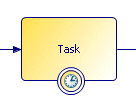
For example, the following intermediate timer event has been placed on a task boundary:
In the Properties view, you can choose a script type from the Script Defined As list:
Note: Depending on the destination environments selected, there can be other script types in the
Script Defined As
list.
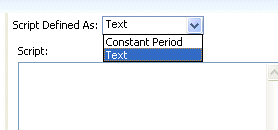
Select one of the script types:
-
Free TextIf you want to leave the implementation of the script for the solution designer, you can select Text and use this area provided to describe the desired behavior for the script.
-
Constant PeriodThis allows you to specify the timeout period after the event is initiated using the following time units: Years, Months, Weeks, Days, Hours, Minutes, Seconds, and Micro Seconds.
-
JavaScriptThis script type allows you to enter JavaScript statements in the space provided. For more information, see the appropriate implementation guide.Note: The JavaScript script type is not available in the Business Analysis capability.
-
UnspecifiedThis means that no description or script is supplied.