Refactoring Activities into a Subprocess
You can create a new call subprocess activity and subprocess by extracting existing objects.
- Procedure
- Select the objects that you want to put in the subprocess. For example:

In this example, the two user tasks have the following parameters (two data fields and one formal parameter):
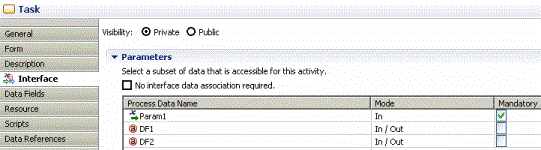
The user tasks also have a participant associated with them.
Select all three tasks.
- Right-click and select .
- Because the data fields and participants are only referenced in this activity (and not used by any other activities), the following message is displayed:
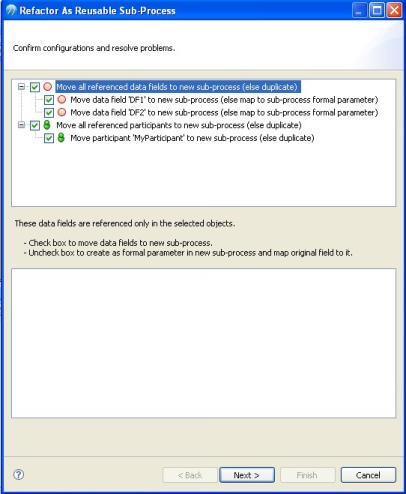 For the participant, TIBCO Business Studio - BPM Edition gives you the option of either moving this participant into the sub-process, or duplicating the participant in both the parent process and the subprocess.If you select the data fields, they are moved into the subprocess.If you do not select the data fields, they are created as formal parameters in the subprocess (and mapped to those formal parameters).
 - Complete the dialog as follows:
- Enter a name for the subprocess that you want to create.
- Select the New Sub-Process is a transaction checkbox if you want the new subprocess to become a transaction and therefore be under transaction control (see User Tasks and Pageflow Processes).
- Select the Insert start event in new sub-process and Insert end event in new sub-process checkboxes to control whether start and end events are added to the refactored subprocess.
- Click
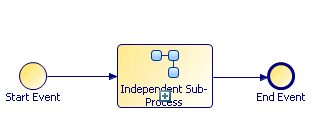
Finish. The objects that you selected are copied to the new subprocess and the selected objects are replaced with a task that calls the call subprocess.
If you chose to create formal parameters for the data fields, you can see them in the Project Explorer, under the subprocess:
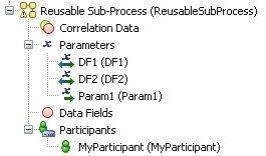
In addition, if you click the task in the parent process that calls the subprocess and go to the Properties view, you can see the mappings that have been created between data fields and formal parameters of the parent process and the formal parameters created in the subprocess. For example:
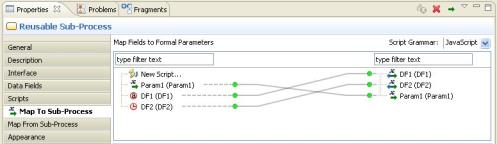
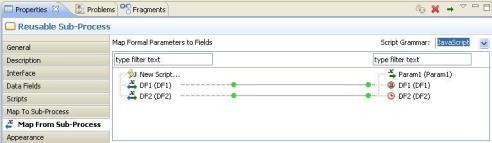
Notes on Refactoring Objects into Subprocesses:
- Formal parameters in the parent process are created as formal parameters in the subprocess. They are mapped according to their mode as defined in the process API.
- If a data field is referenced only in the selection that you are refactoring, you have the option of moving or copying it. Data fields that are copied into the subprocess are created as formal parameters and mapped. Data fields that are moved into the subprocess are created as data fields. By default, data fields are moved. In order to copy them as formal parameters, you must uncheck the selection boxes on the dialog.
- If a data field is referenced in one or more of the tasks you select for refactoring but is also referenced elsewhere, it is automatically copied into the subprocess as a formal parameter.
- A mapping is created between data fields and formal parameters of the sub-process and any corresponding formal parameters that are created in the subprocess. You can view this mapping by selecting the task that calls the sub-process and clicking the Map To Sub-Process and Map From Sub-Process tabs in the Properties view.
Changes in Process Logic:
When refactoring objects into a call subprocess, you can potentially change the logic of the process flow.
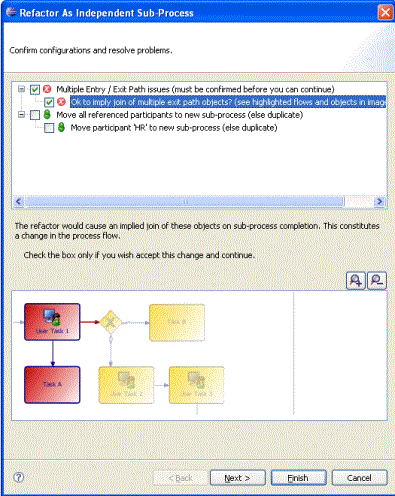
Consider the following process:
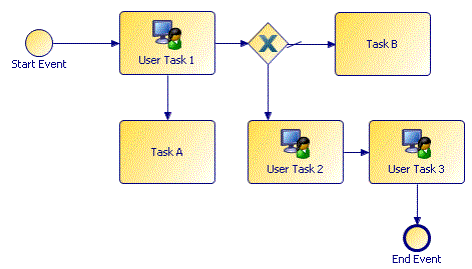
In this process, flow proceeds from User Task 1 to the gateway without necessarily waiting for Task A to finish. If User Task 1 and Task A are refactored into a subprocess, an end event is inserted into the subprocess, effectively synchronizing the flow. TIBCO Business Studio - BPM Edition prompts you to confirm this change to the process: