Creating Dynamic Sub-Processes
A dynamic subprocess can be created by modifying a call subprocess activity.
For more information, see "Dynamic Subprocesses" in the TIBCO Business Studio - BPM Edition Concepts Guide.
- Procedure
- Create a process interface that specifies the start event and its input/output parameters. Each process that is to be invoked from the dynamic sub-process task must implement the same process interface. For more information, see "Process Interfaces" in the TIBCO Business Studio - BPM Edition Concepts Guide.
- Create one or more call subprocess activities in your process.
- From the General tab for each call subprocess activity:
- Using the picker, select the process interface created in Map the input to the interface in Map To Subprocess.
- In the Runtime Identifier field select a formal parameter or data field using the picker. This must be a text field or an array. Arrays can be used for multi-instance subprocess tasks where potentially different subprocesses are required for each instance of the same task.
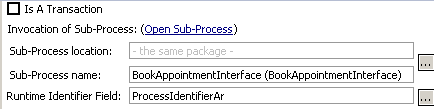
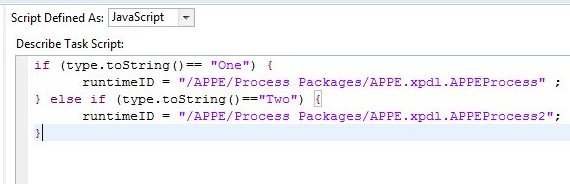
- Initialize the Runtime Identifier field. For example, for a multi-instance subprocess task you could create a Script task before it to populate the array data field with a subprocess name element for each task instance. For a single instance subprocess task simply set the runtime identifier field to the required subprocess name in a script prior to the task.
For a subprocess implementation which resides in an external subprocess library, you could use a script something like the script shown in the following illustration:
- In the call subprocess activity, map data to and from the called process (to pass data between the process and subprocess):

Subtopics