Using an End Error Event to Throw a Fault Message
You can create an end error event to throw a fault message.
- Procedure
- Add an error end event at an appropriate point in the process.
- Select the error event.
- On the
General tab of the
Properties view:
- Enter a suitable Label for the error.
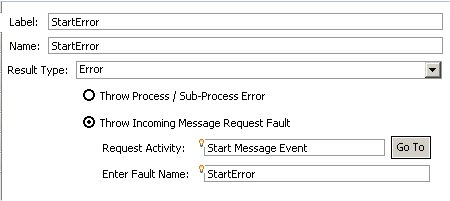
- Click Throw Incoming Message Request Fault.
- In the Request Activity field, use context assist to select the task or event that you want this error to be associated with. This must be the message start event, receive task or catch message intermediate event that defines the request part of the appropriate request-response operation.
- In the
Enter Fault Name field, use content assist to select the appropriate fault message that you want to use to throw this error. (Content assist lists each fault message that is defined in the WSDL associated with the selected task or event.)
For example:
- On the
Output Fault From Process
tab:
The left-hand side displays the formal parameters available to this task or event, as defined on the Interface tab.The right-hand side displays the fault message parameters defined for the selected fault message (in the WSDL document).
Drag and drop the parameter(s) containing the relevant data about the error onto the appropriate fault message parameter(s).
Using an End Error Event Example
The following process illustrates one way to throw multiple fault messages for a single request-response operation.
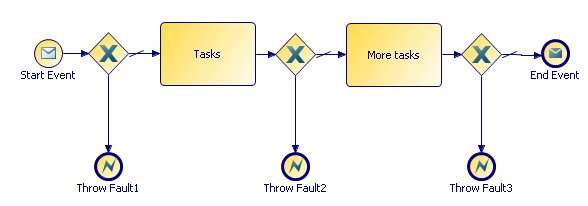
Start Event and End Event are paired to provide a request-response operation, using the following WSDL operation.
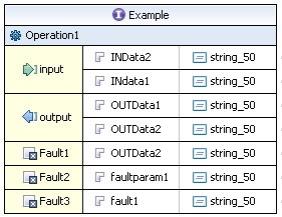
The WSDL operation provides three separate fault messages, Fault1, Fault2, and Fault3.
The process uses three end error events: Throw Fault1, Throw Fault2, and Throw Fault3 to throw these fault messages at appropriate points in the process logic.
Each end error event:
- is associated with the Start Event activity in the Request Activity field.
- is configured to throw the appropriate error: Fault1, Fault2, or Fault3 in the Enter Fault Name field.
- maps the appropriate process data for the error (using formal parameters) to the appropriate fault message parameter: OUTData2, faultparam1, or fault1 on the Output Fault From Process tab.
When the operation is invoked by a client application, the process will either:
- return the output message provided by the End Event, if the process completes successfully.
- throw fault message Fault1, Fault2, or Fault3, if one of these errors occurs.
It is the client application’s responsibility to catch and handle the thrown fault messages. For more information about how to do this from a process, see Catching WSDL Fault Messages on a Request-Response Operation.