Creating an Association Relationship Between Two Case Classes
Association relationships define potential relationships between two case classes - for example, customers and orders. From within a business process, you can use these relationships to create links between case objects, and to navigate those links when searching for case objects.
An association relationship must be bi-directional, and optional in each direction. (Neither end of the relationship can have a multiplicity value of "one" or "one or more".) You can define multiple associations between the same two classes, if appropriate.
- Procedure
- In the BOM Editor, click Association in the Relationships section of the palette.
- Click one case class and drag the relationship to the other case class.
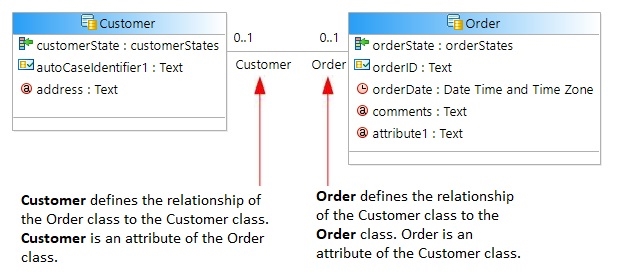
This creates a bi-directional association relationship between the two case classes. By default, each end of the relationship has the name of the destination class, with a multiplicity of 0..1. For example:
- For each end of the relationship, edit the
Multiplicity Value and identifying
Label/Name as needed to define the intended relationship. For example:
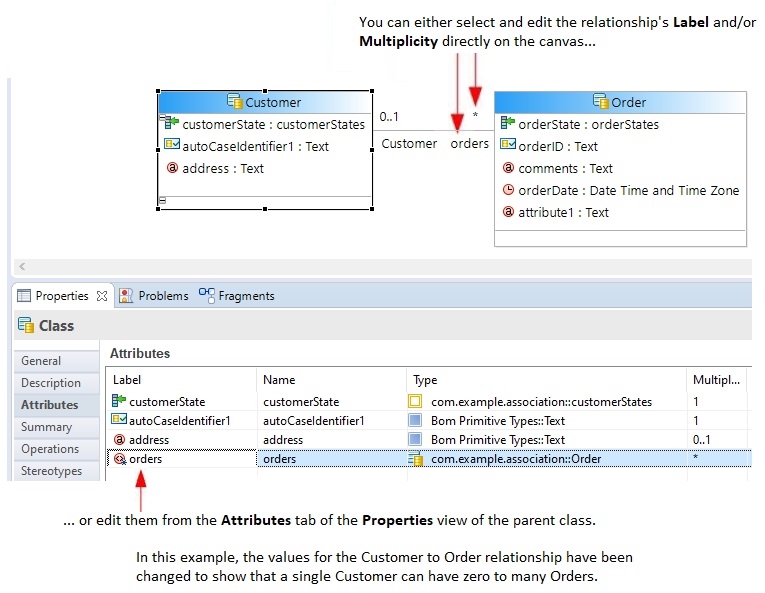 Note: It is good practice to keep a relationship's Label and Name the same. This makes it easier to avoid mistakes when constructing, for example, an attribute path in the DQL query on a navigateByCriteria method.
From within a process that references this case data model, you can use association relationships to:
- create association links between case objects of the related case classes. You can also delete association links when they are no longer required.
- navigate those links when searching for case objects.
Using the relationship shown above, this would enable you to, for example, find all orders placed by a particular customer on a particular date.