Incoming Request/Global Signal Event Handlers in Business Processes
Incoming request event handlers allow you to process a separate flow in an existing process instance via a runtime process REST API call. As with any incoming request activity, correlation to a process instance is done using the runtime process instance ID.
Blocking and Non-Blocking Incoming Request Handlers
You can configure what happens when an event handler is triggered prior to completion of the flow from a previous triggered instance.
The following configuration options are available:
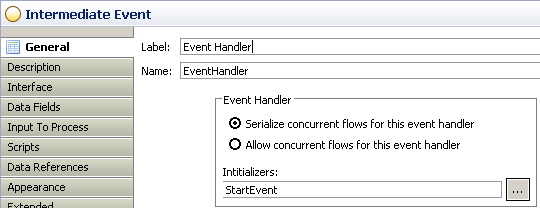
- Blocking: The Serialize concurrent flows for this event handler option means that further event triggers are queued until an existing event handler flow completes (unless the main process flow completes).
- Non-blocking: The Allow concurrent flows for this event handler option means that if the event is triggered multiple times, the flow from each can be processed in parallel.
The configuration options are shown under Event Handler in the following image:
Initializing Event Handlers
For global signal event handlers, you can specify a list of activities after which the event handler can be initialized (or reset if already initialized). You need to do this because if the value of correlation data associated with the event handler is changed during the life of the process then existing event handlers are not triggered according to the new correlation data value unless they are initialized.
You also need to do this if the initial correlation values are set in the complete script of the start event or any other script activity.
You must also do this if the correlation data required for the event handler is not explicitly initiated in mapping on all process start activities (otherwise the event handler is initialized when correlation data might not yet have been set).
Select initializers for the event handler using the Initializers: selection under Event Handler (as shown in the image). You can select any task, embedded-sub-process or event activity (except those attached to task boundary, or events that are themselves event handlers). This includes activities on event handler outgoing flows.
If you do not specify any activities then the event handler initializes during processing of the first start-activity, but before the start-activity's Complete script. For this to happen one of the following conditions must be met:
- The correlation data associated with each event handler must be initialized in correlation data mappings in each start activity.
- You must explicitly state the activities after which the event handler(s) are initialized. Once any activities are explicitly stated in this way, then the event handler is only initialized after those activities complete.
Even if the correlation data is initialized in the complete script of a start activity, if you wish an event handler to initialize correctly you must use this method of explicitly stating the initialize-after activities on each event handler (that is, if the event handler is to be initialized at start of a process instance then the start activity must be explicitly stated).
Example: Using Event Handlers in a Business Process
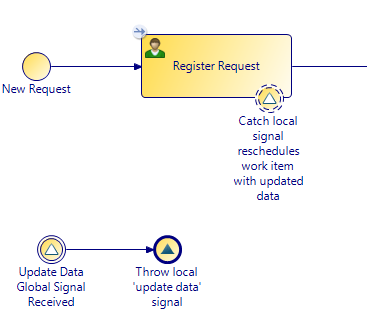
The following example illustrates the process of updating work item data using an event handler and a non-canceling signal event.
In this example, a business process is used to manage a request. The event handler is used to update information related to the request. This updated information is then used as input via a non-canceling signal event to the task Register Request.