Custom Channel Lifecycle
By using the Java API, you can create your own custom channel according to your requirement. While implementing a custom channel, you can extend custom channel classes and override custom channel methods that BusinessEvents invokes during startup.
Refer to Java API Reference for complete list of Java classes and interfaces for the custom channel. However, few of the key Java classes, interfaces and their key components are mentioned in the following sections identifying the channel lifecycle in BusinessEvents.
Channel and Destination Class Instantiation
Channel and destination class instances are created during the engine startup by using the information provided in the
drivers.xml file and in the project. For each of your custom channel defined in the project, BusinessEvents creates one instance of the driver class as defined in
drivers.xml and calls the driver class's
getChannel method. Typically, the
getChannel method must return a new channel instance of your channel class.
Similarly, for each of the destination of each of your custom channel found in the project, BusinessEvents calls
Driver.getDestination method. Typically, the
getDestination method return a new instance of your destination class.
During startup, BusinessEvents invokes the various lifecycle methods of your custom channel in the sequence specified in the following figure.
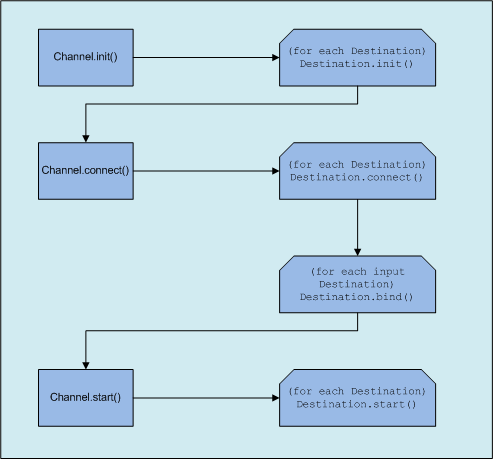
Channel.init
Initialize your channel in this method. Extend the
BaseChannel class to create your custom channel class and then you can override the
init method to perform initialization of your channel. During initialization, your custom channel can access the channel properties that you have defined in
drivers.xml using the
getChannelProperties method and access the runtime TIBCO BusinessEvents properties using the
getBeProperties method. For example, when you override the
Channel.initmethod, you can set up initialization objects such as thread pools for internal use, connection objects for connecting to your channel endpoints, and so on.
If you override the
init method, you must initialize each destination manually, or you call the
super.init method. The
super.init method initializes each of the channel's destinations by calling the
BaseDestination.init method for each destination of the channel.
Destination.init
Extend the
BaseDestination class to create your custom destination class. In case, the destination need initialization, override the
init method to initialize your destination. You can access destination properties by using the
getDestinationProperties method. You can access the parent channel instance by using the
getChannel method and in turn channel and TIBCO BusinessEvents properties from the channel instance.
Channel.connect
For connection based transports, such as JMS or WebSphere MQ, override the
connect method to initiate the connection to the underlying data provider or data source. By default, the
BaseChannel implementation calls the
BaseDestination.connect method for each of your destinations. In case your destination does not have a connection semantic, you can simply implement an empty method.
If you override the
connect method, you must initiate connection for each destination manually, or you call the
super.connect method. The
super.connect method initiates connection for each of the channel's destinations by calling the
BaseDestination.connect method for each destination of the channel.
Destination.bind
The next step in the TIBCO BusinessEvents startup sequence is the
BaseDestination.bind method. Whenever an agent becomes
active, TIBCO BusinessEvents calls the
BaseDestination.bind method for each of the destination defined in CDD under
Input Destinations Collections of the agent. The
bind method binds the underlying RuleSession to a destination, that is, whenever a message arrives on that destination endpoint, the message is routed to the RuleSession associated with the destination. Thus, the message triggers the rules associated with its bounded RuleSession.
In the
bind method, you must start your destination's message listeners and store or bind the EventProcessor instance, that is handed out by the framework to this listener. When a message arrives at this listener's endpoint, you must convert this message to an
event by using the serializer for your destination, and then send that event to the TIBCO BusinessEvents framework by calling the
EventProcessor.processEvent method.
Channel.start
The next step during TIBCO BusinessEvents startup sequence is the
BaseChannel.start method. For each of the channels, TIBCO BusinessEvents calls the
start method. By default, the
BaseChannel.start method calls the
BaseDestination.start method for each destination. Use this call to start dispatching messages from the underlying transport.
If you override the
start method, you can call the
super.start method to start each of the channel's destinations by calling the
BaseDestination.start method.
If you override the
start method, you must start each destination manually, or you call the
super.start method. The
super.start method starts each of the channel's destinations by calling the
BaseDestination.start method for each destination of the channel.
Channel.suspend
TIBCO BusinessEvents invokes the
BaseChannel.suspend method when you need to suspend the channel. Provide a meaningful implementation in this method to suspend receiving of messages for your destination.
If you override the
suspend method, you need to suspend each destination manually, or you can call the
super.suspend method. The
super.suspend method suspends each of the channel's destinations by calling the
BaseDestination.suspend method for each destination of the channel.
Channel.resume
TIBCO BusinessEvents invokes the
BaseChannel.resume method when you need to resume the suspended channel. Provide a meaningful implementation in this method to resume receiving of messages for your destination.
If you override the
resume method, you need to resume each destination manually, or you can call the
super.resume method. The
super.resume method resumes each of the channel's destinations by calling the
BaseDestination.resume method for each destination of the channel.