Exporting a Diagram to an Image
Using the Export to Image option you can save the diagrams locally for later use.
- Procedure
- From the top menu, select
. You see the Export Drawing to Image dialog.
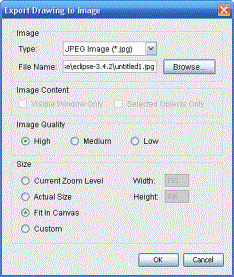
- Select the type of the image from the Type list.
- In the File Name field, specify the file name along with the location.
- Select the checkboxes Visible Window Only and Selected Objects Only appropriate to specify the content of the image.
- Specify the Image Quality as appropriate.
- Specify the size, and click OK.
Note: Only if you select an object in the diagram, then Selected Objects Only is enabled.
Result
The diagram is exported to an image, and saved on the system.