Data Migration Options
When migrating project data, you can evaluate the object management approach for your project requirements such as In-Memory(Unclustered) or Cache(Clustered) depending on the TIBCO BusinessEvents version 6.x supported options.
With TIBCO BusinessEvents version 5.x, the default cache provider is TIBCO ActiveSpaces version 2.x with or without persistence option.
With TIBCO BusinessEvents version 6.x, for clustered object management, you can use Apache Ignite as a cache and cluster provider, TIBCO FTL as a cluster provider with existing ActiveSpaces 2.x. For details about the ActiveSpaces 2.x support, see the announcement on TIBCO Support Portal.
The following image provides the graphical illustration of a possible object management strategy for a project:
Figure 38: Object Management Strategy for a Project
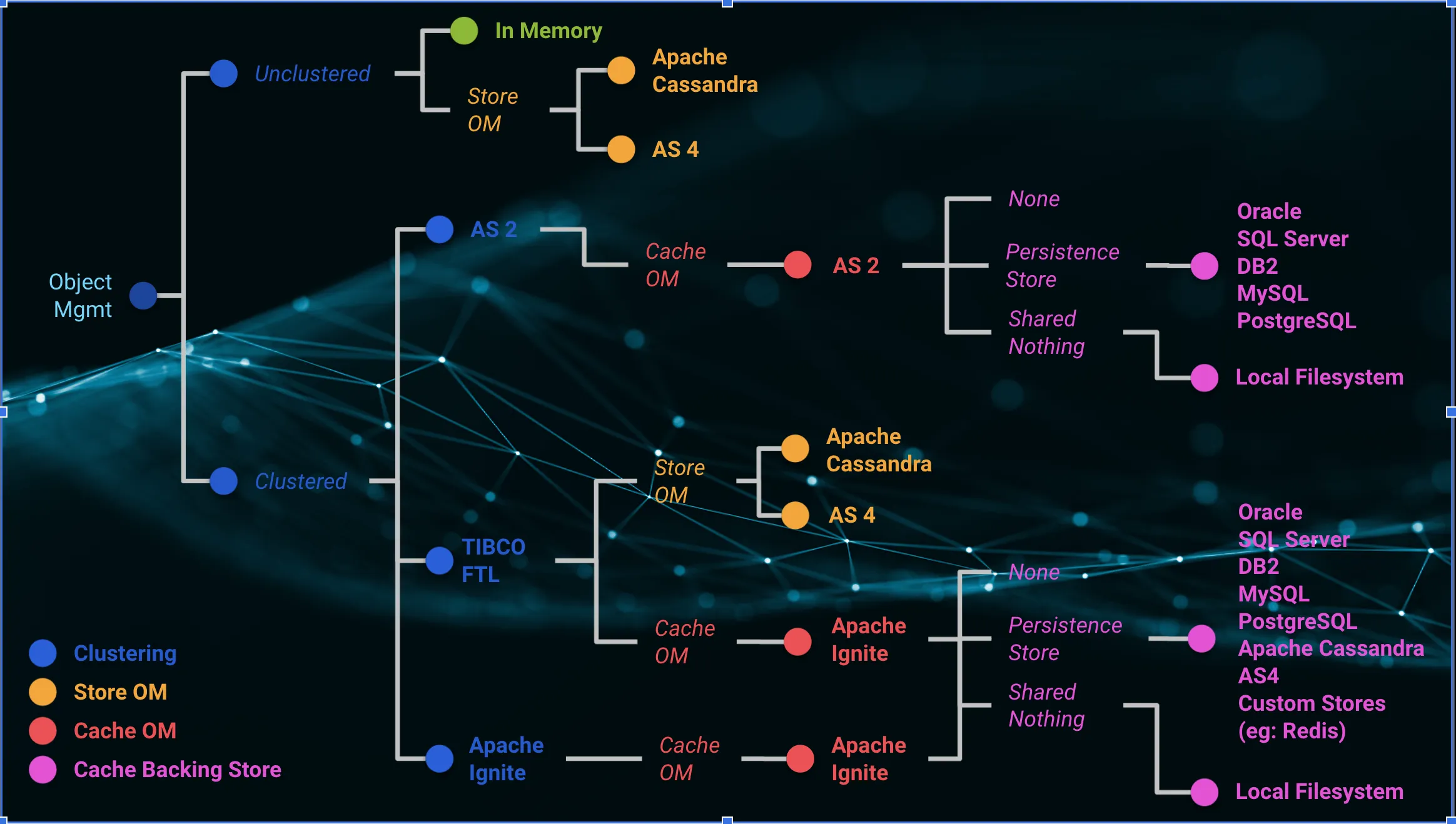
- For the object management configurations that are using internal ActiveSpaces 2.x cache, TIBCO recommends refactoring the project design or adopt the newly supported Apache Ignite cache provider.
- The minimum supported versions for data migration to new stores are ActiveSpaces version 2.3 and later, and TIBCO BusinessEvents version 5.5.0 and later.
The following table summarizes the possible options and respective data migration processes:
| Existing TIBCO BusinessEvents 5.x configurations | Possible TIBCO BusinessEvents 6.x migration options | Required migration processes |
|---|---|---|
|
|
Requires project redesigning ActiveSpaces 4.x store functions are provided with TIBCO BusinessEvents version 6.x. |
|
Requires project redesigning and
catalog functions implementation in TIBCO BusinessEvents Catalog functions are provided with TIBCO BusinessEventsversion 6.3.1. |
|
|
Requires project redesigning ActiveSpaces 4.x store functions are provided with TIBCO BusinessEvents version 6.x. |
|
|
Requires project redesigning | |
|
Requires project redesigning | |
|
|
Requires project redesigning and
catalog functions implementation in TIBCO BusinessEvents Catalog functions are provided with TIBCO BusinessEvents version 6.3.1. |
|
|
Requires project CDD changes for Apache Ignite cluster or cache configurations |
|
Requires project CDD changes for TIBCO FTL or Apache Ignite, cluster or cache configurations | |
|
|
Requires project CDD changes for TIBCO FTL and Apache Ignite configurations Note: Running the migration utility and data migration steps are not required. |
|
Requires project CDD changes for Apache Ignite cache or cluster configurations Note: Running the migration utility and data migration steps are not required.
|
|
|
|
Requires project redesigning for the No Cache option Requires store option implementation For details, see Configuring ActiveSpaces as a Store Provider and Configuring Apache Cassandra as a Store Provider. |
|
Requires project CDD changes for cache or cluster configurations Note: Migration of data is not required because when using the legacy ID, the database setup is the same for TIBCO BusinessEvents version 5.x (w/ActiveSpaces 2.x) and version 6.x (w/Apache Ignite).
|
|
|
Requires project CDD changes for cache configurations Requires creation of new tables as the table structure is different with new ID implementation in TIBCO BusinessEvents version 6.x and then migrating data from old tables to new tables. Note: The scripts to create new tables and migrate data from old tables to new tables are provided with TIBCO BusinessEvents version 6.3.1.
To generate these scripts, use the CLI Script Projects containing unreferenced objects or scheduled events require an additional property setting, see allowAdjust property setting for further details. |
|
|
|
Requires project CDD changes for cluster or cache configurations Requires running the migration utility For details about the
Note: TIBCO BusinessEvents version 5.x cache agent and the ActiveSpaces Metaspace must be up and running. For details about starting the agents, see the TIBCO BusinessEvents Administration guide.
For a detailed process, see Migrating Data from Old TIBCO BusinessEvents Projects to Version 6.x |
For detailed processes, see Cluster Configurations for Your Project.
For additional custom implementations or references, see the TIBCO BusinessEvents Github page.
allowAdjust property setting
Migrating projects with legacy ID and shared all persistence to new ID requires an additional property setting for projects containing:
- Concepts with parent-child relationship which may have unreferenced contained or reference concepts saved in the project database as historical data.
- Unreferenced contained or reference concept type attribute references in entity tables for deleted objects.
- Parent references for deleted objects in the entity, secondary, workitems or statemachine database tables.
- ParentProcess Id references for deleted objects.
- Database with scheduled events (created with legacy ID) in workitems table during migration to the new ID.
- A simple process.
To handle such project data migrations, set the property be.engine.id.migrated.allowAdjust to true in the project CDD or in the be-engine.tra file located at BE_HOME\bin\. The default value is false.
This property allows adjusting the deserializer to read legacy IDs of entities in the database even when the project is running with new IDs.
For projects with scheduled events, when all the earlier scheduled events are triggered and there are no more old events in the workitems table, this property is ineffective and can be removed.