Deploying Your Solution
Once you have constructed your process definitions you will want to
deploy to a selected BusinessWorks runtime. For a process definition that
uses OpenSpirit activities make sure that:
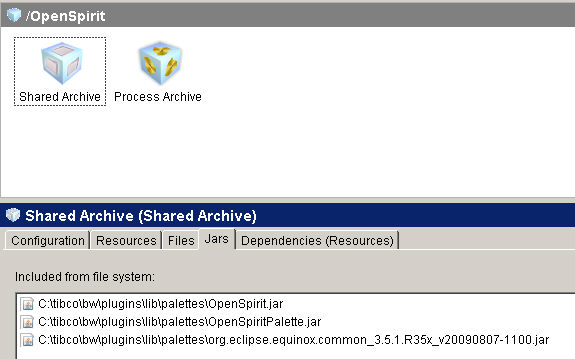
- The three required OpenSpirit jar files (found in TIBCO_HOME/plugins/lib/palettes)
are included in your ear file (as illustrated below)
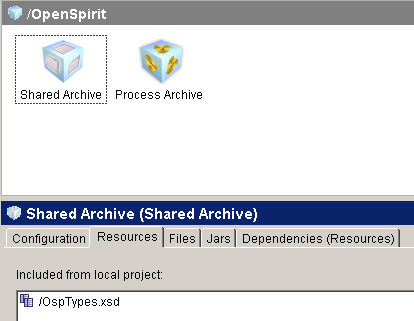
- If you have imported the OspTypes.xsd into your project and referenced
it you will also need to include it in your ear file:
- The server (Linux or Windows) where you want to deploy to must
have an OpenSpirit satellite or master installation ( v 3.2.2 or newer)
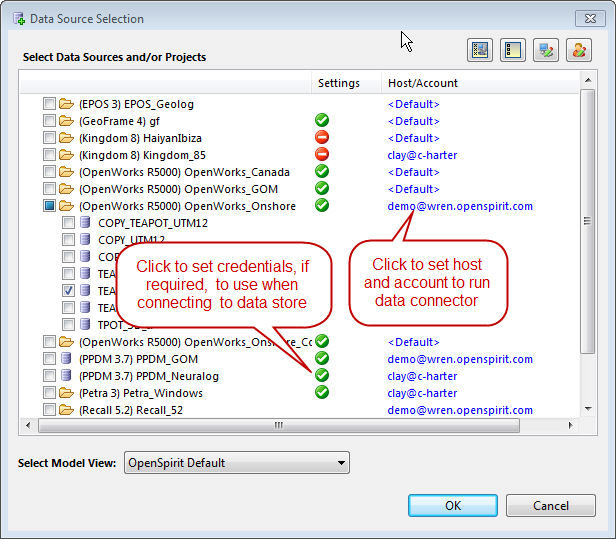
- If you are setting the OpenSpirit user account in (OspUser)in any
activity then the account that is running the BW engine that
you are deploying to must be designated as an OpenSpirit administrator
(this may be done in the OpenSpirit Desktop User Manager) . Also,
you must have set the preferences for the OpenSpirit user account
to indicate where to run OpenSpirit data connectors and what credentials
to use for this (all done through the OpenSpirit Desktop Data Selector
- as shown below)