
Input Sources
This section provides information on the TCP Stream and Dynamic Input Stream input sources.
TCP Stream
A TIBCO ActiveMatrix BusinessWorks Plug-in for Large XML activity can accept a TCP stream as an input XML source. Currently, only the GetFragment activity supports a TCP stream as an input XML source. For this, you require:
- A TCP plug-in activity, such as TCP Open Connection, which is used to create and open a connection with the TCP server providing the large XML TCP stream. This connection is used in the GetFragment activity as input. For more information on the TCP plug-in activities, refer to the "TCP Connection" section of TIBCO ActiveMatrix BusinessWorks Palette Reference.
- The TCP server providing the large XML TCP stream must be running.
A sample process is as follows:
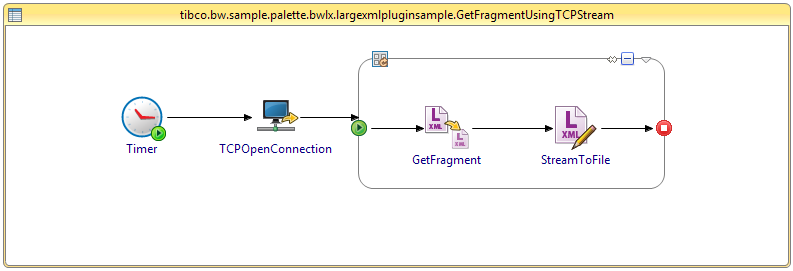
You can specify a timeout period, that is, the time to wait (in milliseconds) for a TCP stream over a TCP connection. If the timeout expires, a Read timeout error is thrown. If the connection is closed, a Connection Reset error is thrown.
Dynamic Input Source
With a Dynamic Input Source, a TIBCO ActiveMatrix BusinessWorks Plug-in for Large XML activity can get fragments from a file or input stream while the file or input stream is being written to. That is, the file or input stream, is incomplete.
Currently, only the GetFragment activity supports a dynamic input source.