Using the IBM Key Management Tool to Review the Personal Certificate Name
The IBM Key Management tool is used to open the keystore, and it is normally started by the script in the
mqm/bin/strmqikm directory, and the executable is called
iKeyMan.
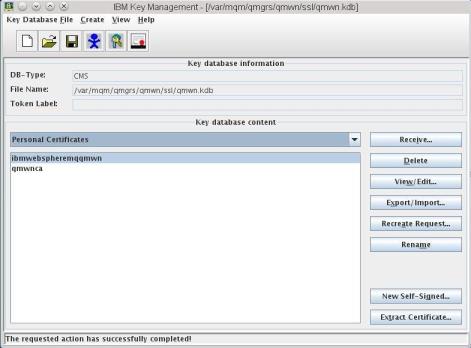
The Personal Certificate name must use all lowercase characters. If your queue manager name contains uppercase characters, rename this alias so that all characters are in lower case. If this alias is not correct, the queue manager is not able to open the keystore.
iKeyMan). To retain the same name, you have to use an intermediate name for the rename function to work.
You can also review the CA certificate that is copied using the script to instruct the queue manager to "trust" the client’s certificate. To see this information, select Signer Certificates from the list below the Key database content heading.
The following figure shows the keystore created in Step 1. Note the name of the personal certificate is ibmwebspheremqqmwn. This special alias is composed of the tag ibmwebspheremq with the name of the queue manager concatenated onto it. In this example, the queue manager name is qmwn.