| You might encounter a
file not fount, or cannot find ecore file error when creating a plug-in.
|
Open a new workspace and create the plug-in again.
|
| A refresh error occasionally occurs when generating the plug-in bundles because the project is not opened yet.
|
Reopen the project and refresh the project, and then close the project.
|
| A configuration error occurs after loading the property file of the plug-in to be edited.
|
Check the ecore file according to error information.
|
| An error occurs after specifying the property file that contains the plug-in configurations to be updated.
|
Open the
bw6_devkit_configuration.properties file, ensure the values of the
plugin.project.output.location attribute and the
activity.ecore.files.dir attribute are the current the location of the plug-in project folder.
|
| After generating the palette code, an error dialog is displayed when importing projects.
|
Close the error dialog.
|
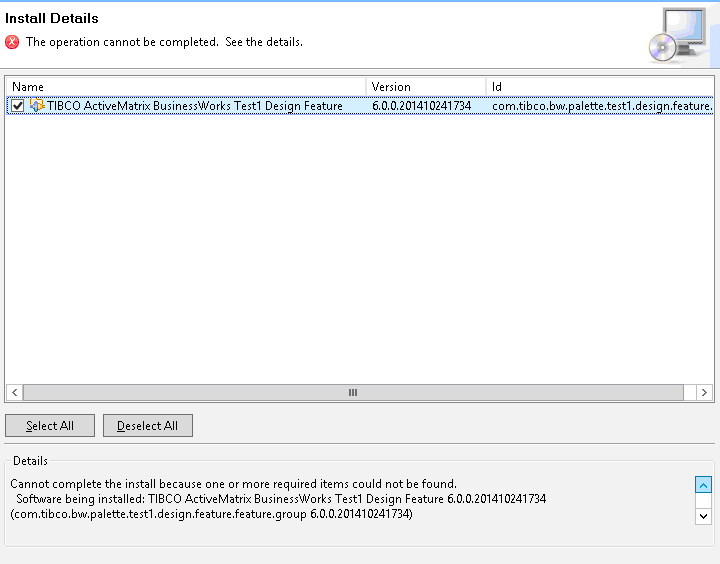
| When you do a repackage for a plug-in that you have created by using TIBCO ActiveMatrix BusinessWorks Plug-in Development Kit, if you import the design, runtime, and model features to the same folders that contains the features imported in the first package, and you also use the same output folder for the generated package.
An error occurs when you install the plug-in with the second package in TIBCO Business Studio.
|
- Delete the exported features.
- Export the runtime, design-time, and model features to three folders respectively, and then regenerate the installer.
|