Editing a Plug-in
You can update the activity attributes and schema, delete an activity, and add new activities.
Before editing a plug-in, see Merging Code for more details about how BusinessWorks Plug-in Development Kit merges the code.
- Procedure
- Open TIBCO Business Studio in one of the following ways:
 Microsoft Windows: click
.
Microsoft Windows: click
.
 Linux: run the TIBCO Business Studio executable located in the
TIBCO_HOME/studio/version_number/eclipse directory.
Linux: run the TIBCO Business Studio executable located in the
TIBCO_HOME/studio/version_number/eclipse directory.
 Mac OS: run the TIBCO Business Studio executable located in the
TIBCO_HOME/studio/version_number/eclipse directory.
Mac OS: run the TIBCO Business Studio executable located in the
TIBCO_HOME/studio/version_number/eclipse directory.
- Open the BusinessWorks Plug-in Development Kit wizard in one of the following ways:
From the menu, click .On the toolbar, click Create a new or modify BW Plug-in Project
 .
Press Alt+T.
.
Press Alt+T. - Click Edit a BW6 Palette.
- In the
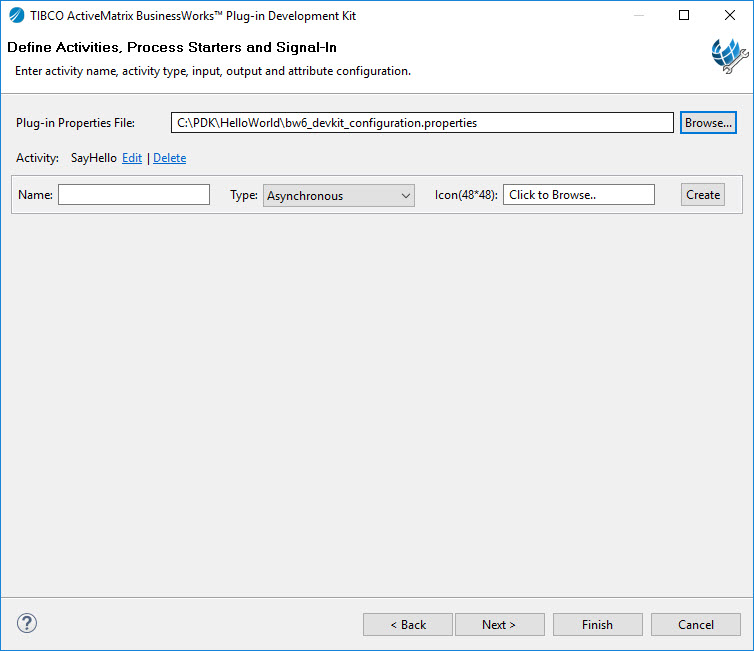
Define Activities, Process Starters and Signal-In dialog box, click
Browse next to the
Plug-in Properties File field to locate the
bw6_devkit_configuration.properties file that contains the plug-in configurations.
The bw6_devkit_configuration.properties file is located in the project folder of the plug-in.The activities of the plug-in are displayed in the Define Activities, Process Starters and Signal-In dialog box.

- Click
Edit to update an activity.
See Editing an Activity for more details.
- Click
Delete to delete an activity.
See Deleting an Activity or more details.
- In the
Name field, enter a name of the activity to be added and select an activity type, and then click
Go to configure the activity.
See Adding and Configuring Activities for more details.
- Click Finish to generate activities.
- To add business logic, see Adding Business Logic.


Subtopics