Data Event Poller Activity
The Data Event Poller activity polls the change in a stage table in a specified time interval. The configuration allows you to generate the required trigger SQL script file to create stage table and triggers.
General
The General tab has the following fields:

| Field | Literal Value/Process Property/Module Property? | Description |
|---|---|---|
| Name | No | The name to be displayed as the label for the activity in the process. |
| Configuration Resource | Yes | Shared configuration resource containing information about the ADB Configuration connection. |
| Schema | No | The DBPoller schema which is configured with the schema table is based on the XSD generated by the DBPoller schema.
Note: You cannot apply or generate the trigger if you are offline; you must be connected to the database to fetch table metadata.
|
| Acknowledgment Mode | No | Mode of acknowledgment of the activity.
|
- Back up the respective old tables and create the tables with the backup records.
- To create the modified indices, triggers, and sequences run the specific queries manually. Use the Generate Trigger button on the Data Event Poller activity for generating these queries.
Description
Provide a short description for the activity.
Advanced
This tab has the following fields:
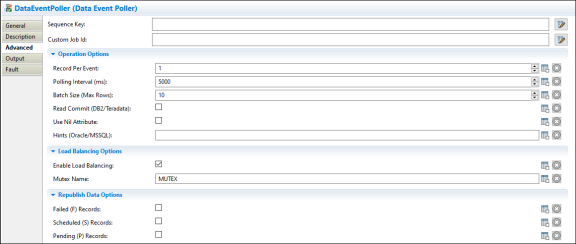
| Field | Literal Value/Process Property/Module Property? | Description |
|---|---|---|
| Sequence Key | No | This field can contain an XPath expression that specifies the processes that must run in order. Process instances with sequencing keys that evaluate to the same value are executed sequentially in the order the process instance was created. |
| Custom Job ID | No | This field can contain an XPath expression that specifies a custom ID for the process instance. |
| Operation Options | ||
| Record Per Event | Yes | Specifies the maximum number of database records to be retrieved per event to start a ActiveMatrix BusinessWorks job. The default value is 1. |
| Polling Interval (ms) | Yes | Specifies the amount of time in milliseconds for polling.
Default: 5000ms. |
| Batch Size (Max Rows) | Yes | Maximum number of records to be retrieved for each polling, when polling batch is used.
Default: 10. |
| Read Commit (DB2/Teradata) | Yes |
Enables the plug-in publisher to perform a commit operation after selecting a query for DB2. This feature works only when you use a Teradata vendor or DB2 database vendors, including DB2 OS390, DB2 AS400, and DB2 UDB. |
| Use Nil Attribute | Yes | When set to true, the column whose value is null is shown as nil attribute in the activity output.
When set to false, the column whose value is null is not shown in the activity output. Note: This field is applicable only when you use Oracle or MS SQL database.
|
| Hints (Oracle/MSSQL) | Yes | Hints help improve the performance of your queries.
When Data Event Poller activity executes a poll operation to fetch data from a table, using hints greatly enhances the performance. |
| Load Balancing Options | ||
| Enable Load Balancing | Yes |
Load balancing distributes the workload across ActiveMatrix BusinessWorks Application nodes to improve the performance in a high-load scenario. ActiveMatrix BusinessWorks Application nodes with the same mutex name are in the same load balance group. Load balancing is enabled by default. Note: If you enable Load balancing, the order of data processing is not sequential.
|
| Mutex Name | Yes | Name of the Mutex table. This name can be changed.
The default name is the first 20 characters of the publishing table name suffixed with " |
| Republish Data Options | ||
| Failed (F) Records | Yes | If this checkbox is selected, records that have a failed status are republished when the application is started. |
| Scheduled (S) Records | Yes | If this checkbox is selected, records that have a scheduled status are republished when the application is started. |
| Pending (P) Records | Yes | If this checkbox is selected, records that have a pending status are republished when the application is started. |
| Schema Mapping Options | ||
| Design Time | Yes | Specifies the design-time database object's schema. It can be a list of comma-separated schemas. |
| Runtime | Yes | Specifies the runtime table object's schema. It can be a comma-separated list of schemas. |
Output
This tab displays the output schema.
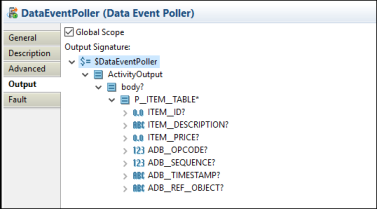
For more information about how different data types are mapped to the XSD type, see Output Mapping.
Fault
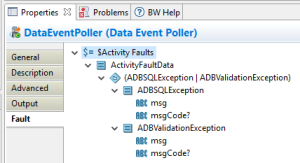
The Fault tab lists the following errors that might occur when you use this activity:
| Error Schema Element | Data Type | Description |
|---|---|---|
| ADBSQLException | String | It has a msg and msgCode field for the exception. |
| ADBValidationExeption | String | It has a msg and msgCode field for the exception. |
| msg | String | The error message returned by the plug-in. |
| msgCode | String | The error code returned by the plug-in. |