CDC DB Listener activity
The CDC-DB Listener activity listens to the operations performed on database tables. When CDC is enabled for a table the data change events for the respective table are logged. The Debezium engine collects these data change event logs and returns the details of the data change.
By default, the plug-in initializes Debezium to capture change data events for Insert (c), Update (u), Delete (d), and Snapshot operations.
However, you can pass the appropriate Operation Options value so that the data changes specific to these activities performed on a table are captured.
CDC Database Configuration Preferences
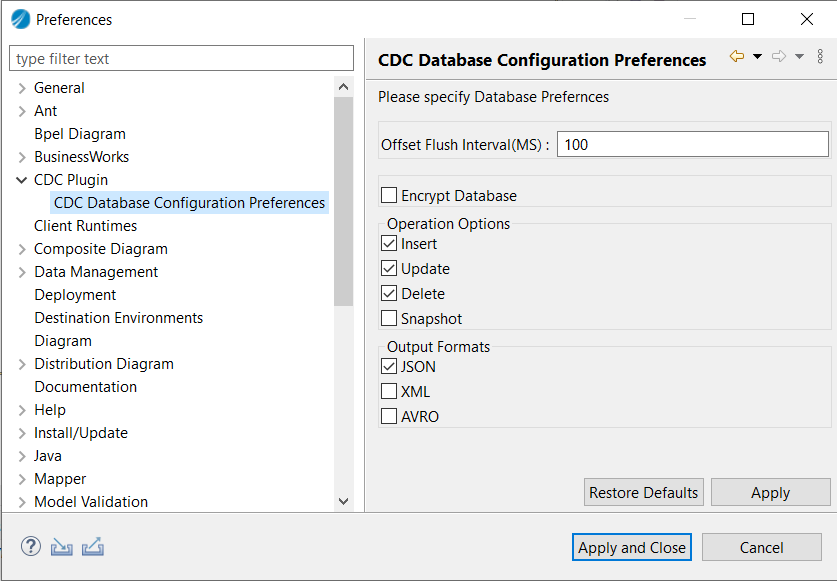
You can specify the Database preferences by setting the default values for the Operation Options and Output Formats.
The Operation Options and Output Formats fields are also available on the CDC-DB Listener's Advanced tab. The default values listed in the CDC Database Configuration Preferences window are preferred until you add the CDC-DB activity to the Palette.
- Procedure
- From the menu, click Window > Preferences to open the Preferences Wizard.
- In the Preferences wizard, click CDC Plugin and then click CDC Database Configuration Preferences to open the CDC Database Configuration Preferences wizard.
- By default the Offset Flush Interval is set to 100 milliseconds. Choose the desired Operation Options and Output Formats, click Apply to set these values as default.
- Now, click Apply and Close.
database.ssl.truststore", and "database.ssl.truststore.password") using the com.tibco.bw.palette.cdc.additionalDbProperties module property.General
The General tab contains the following fields.
| Property | Module Property? | Visual Diff? | Description |
|---|---|---|---|
| Name | Yes | Yes | Name of the palette activity |
| JDBC Connection | Yes | Yes | The name to be displayed as the label for the JDBC connection resource. |
| Table Name | Yes | Yes | The table name displayed as the label |
| Output Format | No | Yes |
The following are the output formats
Note: For MSSQL and Oracle, for Output Format JSON and XML, if data is "null" as literal string, then it is treated as database null instead of "null" as literal string.
|
Description
Provide a short description for the activity.
Advanced
The Advanced tab contains the following fields.
| Property | Module Property? | Visual Diff? | Description |
|---|---|---|---|
| Sequence Key | No | Yes | This field contains an XPath expression that specifies which processes should run in sequence. Process instances with sequencing keys evaluating to the same value, are executed sequentially in the sequence the process instance was created. |
| Custom Job Id | No | Yes | This field contains an XPath expression that specifies a custom ID for the process instance. |
| Operation Options | Yes | Yes |
Facilitate the selection of the appropriate operation.
Note: This Snapshot option performs read operation when app is running for the first time.
|
Module Property
Any additional database or Debezium property can be specified using the com.tibco.bw.palette.cdc.additionalDbProperties module property.
provide.transaction.metadata property is set to true, unable to get the transaction metadata in response.ALTER TABLE <TABLE NAME> ADD SUPPLEMENTAL LOG DATA (ALL) COLUMNS;Tags
Conversations
You can use the Conversations tab to initiate or join a conversation.
Conversations receive a message after the creation of the process instance, which is initiated or joined by an activity. This activity can be used to initiate a conversation. Click the Add New Conversation icon to initiate a conversation. For more information about conversations, see TIBCO ActiveMatrix BusinessWorks™ Application Design.
Output
The following is the output for the activity.
| Output Item | Data Type | Description | ||
|---|---|---|---|---|
| Global Scope | String | The Global scope checkbox makes output variable of the activity from current scope to global level which is at the process level. | ||
| item? | String |
|
Fault
The Fault tab lists exceptions that are generated by this activity.
| Error Schema Element | Data Type | Description |
|---|---|---|
| msg | string | The error message returned by the plug-in. |
| msgCode | string | The error code returned by the plug-in |
-
CDCPluginException: The exception is generated when the plug-in cannot send the request or parse the response.
-
CDCDBException: The exception is generated when any database related error occurs.