Downloading Option Set Metadata
An option set is a list of defined options from which you can select an option to capture specific information.
There are two types of option sets - local and global. A local option set is created for a particular entity and is available to only one entity. A global option set allows you to reuse the metadata in any entity or option set field type. You can download both local and global option set metadata.
- Procedure
- Right-click a
BusinessWorks Application Module/Shared Module, select
Dynamics CRM REST Tools, and do one of the following:For the local option set, click Get per entity OptionSet metadata.For the global option set, click Get Global OptionSet metadata.
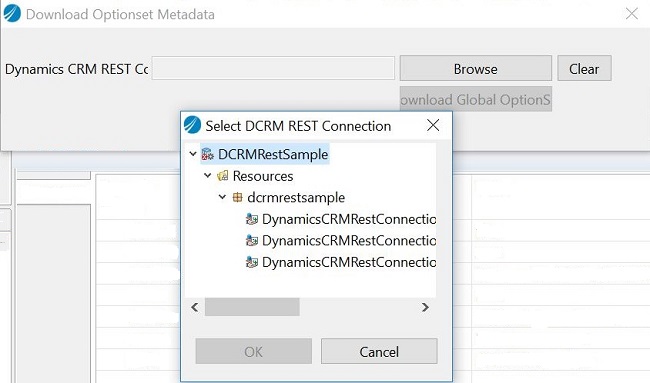
- In the Download Optionset Metadata dialog box, click
Browse to select the Dynamics CRM REST Connection resource for which we need to download the option set metadata.
All the Dynamics CRM REST Connections under selected app module and shared modules are displayed.
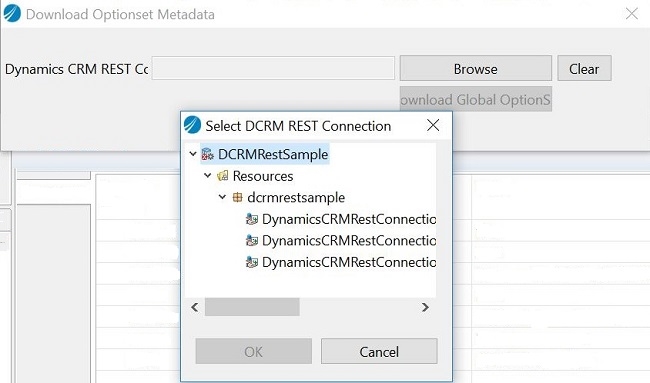
- In the Select DCRM REST Connection dialog box, select a
Dynamics CRM REST Connection resource, and click
OK.
Based on your selection in step 1, the relevant screen is displayed.
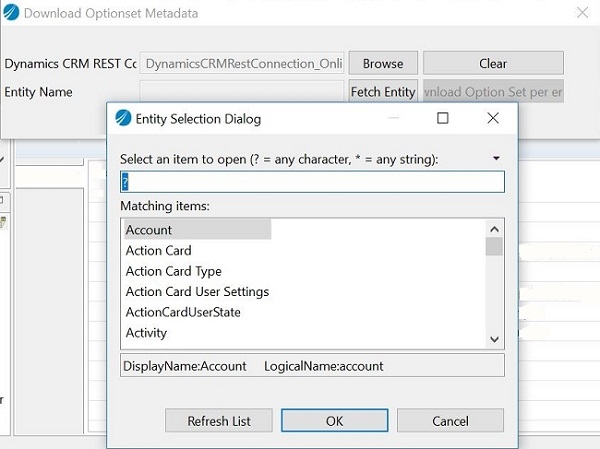
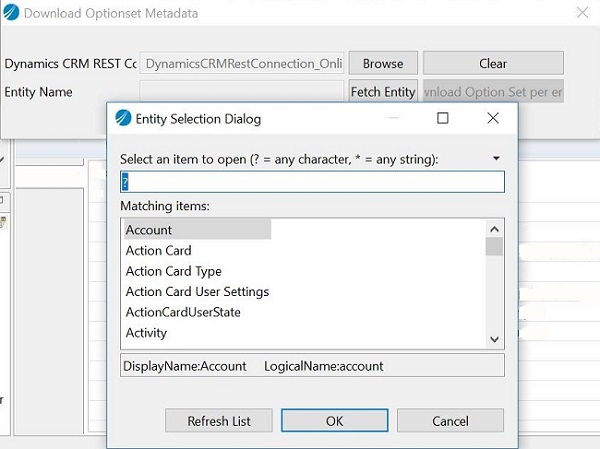
- If you selected
Get per entity OptionSet metadata, click
Fetch Entity, select an
Entity, click
OK, and then click
Download Option Set per entity. OR if you selected
Get Global OptionSet metadata, click
Download Global OptionSet.
The relevant option set is downloaded successfully to a .JSON file in the DynamicscrmRest folder under the Project.