After creating a project, an empty process is created. You can add activities to the empty process to complete a task. For example, create an EJB 2.x remote object.
Note: When you configure a process, you might have to import the CORBA-related classes into the
MANIFEST.MF file of the project. For details, see
Importing CORBA-Related Classes.
Prerequisites
Ensure that you have finished the following tasks before configuring a process:
In the Project Explorer view, click the created project and open the empty process from the
Processes folder.
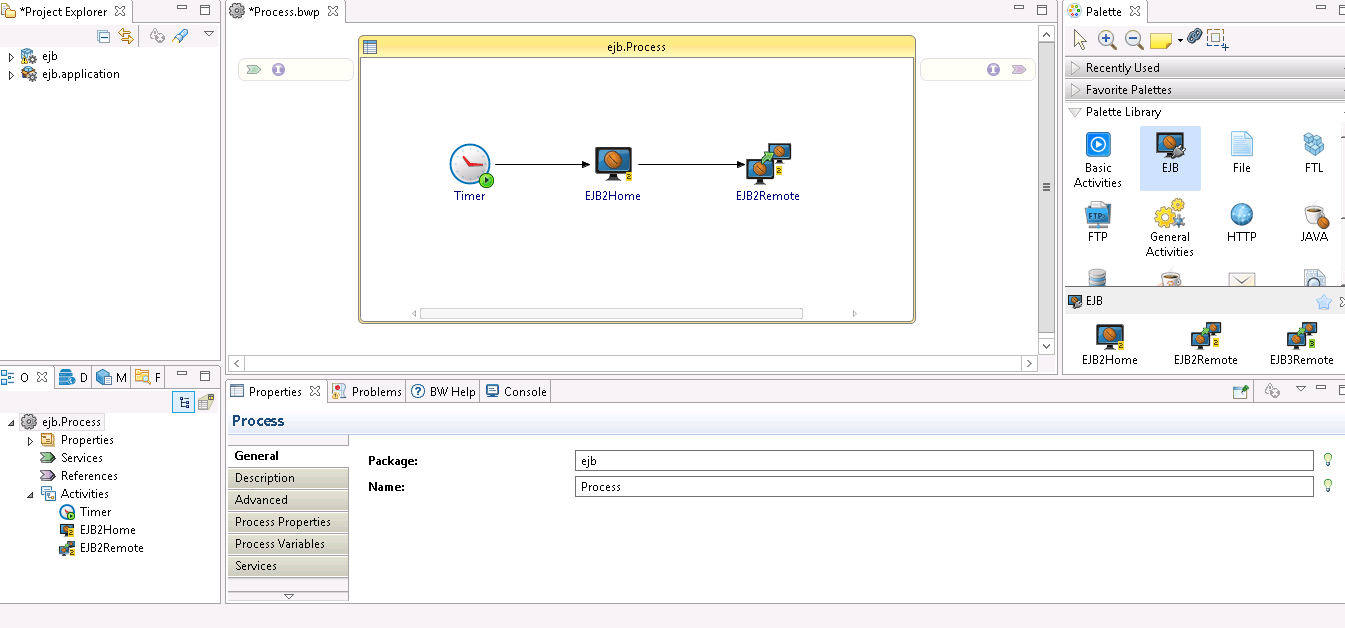
Select activities from the Palette view and drop them in the Process editor.
For example, select and drop the Timer activity from the General Activities palette and the EJB2Home and EJB2Remote activities from the EJB palette.
Drag the
icon to create a transition between the added activities.
Configure the added activities, as described in
EJB Palette.
Note: An EJB Configuration shared resource is required when you configure the EJB activities. See
Creating an EJB Configuration Shared Resource for more details on how to create the EJB Configuration shared resource.

 icon to create a transition between the added activities.