Invoke GCS Object Request Activity
Use this activity to run Object related operations like READ, UPSERT(Combination of INSERT and UPDATE), DELETE and MOVE in Bucket of your Google Cloud Storage project on Google Cloud Storage Platform.
| Operation | Activity Icon (Changes with the operation selected) |
|---|---|
| Read |  |
| Upsert |  |
| Delete |

|
| Move |

|
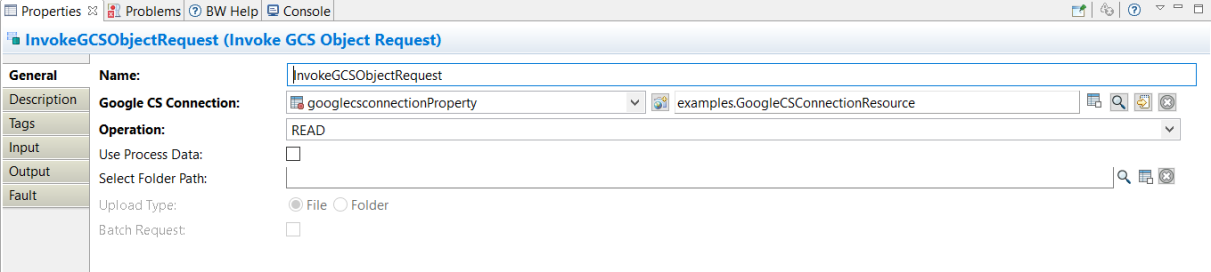
General
The General tab contains the following fields.
| Field | Module Property? | Visual Diff? | Description |
|---|---|---|---|
| Name | No | Yes | The name to be displayed as the label for the activity in the process. |
| Google CS Connection | Yes | Yes | Shared configuration resource containing the information about the GoogleCS Connection. |
| Operation | No | Yes | Type of operation for Invoke GCS Object Request activity. |
| Use Process Data | No | Yes |
If selected and operation is READ, then content of object are there in Output tab, which is base 64 encoded. If selected and operation is UPSERT, then content of object are there in the Input tab for upload, which is base 64 encoded. |
| Select Folder Path | Yes | Yes | Folder path where objects are downloaded. This option is available with READ. It is grayed out if the Use Process Data checkbox is selected. |
| Upload Type | No | Yes | It specifies whether the input type is file or folder. This is applicable when operation is UPSERT. |
| Batch Request | No | Yes | This is applicable for DELETE or MOVE operation. Select the checkbox to perform bulk delete or to perform bulk move. |
Description
On the Description tab, provide a short description for the activity.
Input
Input-mapping structure is based on the Schema selected in the General tab. All the columns and the datatypes are displayed.
The Input tab displays the input schema of the activity as a tree structure. You must enter information as required for any mandatory fields.

Read Operation
(-Dbw.engine.activity.async.waitTime=600000 <in miliseconds>) for time-out to avoid encountering a fault. The activity is timed out after the default time if the VM argument is not specified.| Field | Description |
|---|---|
| bucketName | The name of the bucket. |
| objectName | The name of the object. |
| decryptionKey | An option to set a customer-supplied AES256 key for server-side decryption of the blob. |
| folderPath | The folder path where object/objects are downloaded. The folderPath is available only when Use Process Data is unchecked. |
| BlobListOptions.currentDirectory | If specified, results are returned in a directory-like mode. |
| BlobListOptions.delimiter | Returns an option to set a delimiter. |
| BlobListOptions.endOffset | Returns an option to set a endOffset to filter results to objects whose names are lexicographically before endOffset. |
| BlobListOptions.maxObjectsPerBucket | Returns an option to specify the maximum number of blobs returned per page. |
| BlobListOptions.prefix | Returns an option to set a prefix to filter results to blobs whose names begin with this prefix. |
| BlobListOptions.startOffset | Returns an option to set a startOffset to filter results to objects whose names are lexicographically equal to or after startOffset. |
| BlobListOptions.userProject | Returns an option to define the billing user project. |
| BlobListOptions.versions | If set to true, lists all versions of a blob. |
Upsert Operation
| Field | Description | ||||||||||||||||||
|---|---|---|---|---|---|---|---|---|---|---|---|---|---|---|---|---|---|---|---|
| bucketName | The name of the bucket. | ||||||||||||||||||
| objectName | The name of the object. | ||||||||||||||||||
| acl | Access controls on the object, containing one or more objectAccessControls Resources. Do not supply this field if iamConfiguration.uniformBucketLevelAccess.enabled is true for the bucket to which you are uploading the object. |
||||||||||||||||||
| acl.entity | The type of entity. | ||||||||||||||||||
| acl.entity.type | The type of entity. | ||||||||||||||||||
| acl.entity.domain | The domain associated with the entity. | ||||||||||||||||||
| acl.entity.email | The email address associated with the entity. | ||||||||||||||||||
| acl.entity.projectRole | The projectRole associated with the entity. | ||||||||||||||||||
| .acl.entity.projectId |
The projectId associated with the entity. |
||||||||||||||||||
| acl.role |
The access permission for the entity. Acceptable values are:
|
||||||||||||||||||
| BlobTargetOptions.detectContentType | Returns an option for detecting content type. | ||||||||||||||||||
| BlobTargetOptions.disableGzipContent | Returns an option for blob's data disabledGzipContent. | ||||||||||||||||||
| BlobTargetOptions.doesNotExist | Returns an option that causes an operation to succeed only if the target blob does not exist. | ||||||||||||||||||
| BlobTargetOptions.encryptionKey |
Note: Rotating/changing of encryptionKey is not supported.
|
||||||||||||||||||
| BlobTargetOptions.predefinedAcl |
Apply a predefined set of access to the object. Allowed values are:
If iamConfiguration.uniformBucketLevelAccess.enabled is set to true, requests that include this parameter fail with a 400 Bad Request response. |
||||||||||||||||||
| BlobTargetOptions.userProject | Returns an option for blob's billing user project. | ||||||||||||||||||
| cacheControl | Controls the cache for the object data. If this field is blank and the object is accessible to all the all anonymous users, the default value is public, max-age=3600. |
||||||||||||||||||
| contentDisposition | Content disposition of the object data. | ||||||||||||||||||
| contentEncoding | Content encoding of the object data. | ||||||||||||||||||
| contentLanguage | Content language of the object data. | ||||||||||||||||||
| contentType | Content type of the object data. | ||||||||||||||||||
| crc32c | CRC32C checksum data encoded in base64 in big-endian order of blob. | ||||||||||||||||||
| crc32cFromHexString | CRC32C checksum data from hex string of blob. | ||||||||||||||||||
| customTime | A user-defined timestamp for the object. Format must be in RFFC 39, for example, 2021-05-31T16:39:57+05:30. | ||||||||||||||||||
| filePath | Path of file, which should be uploaded. If you select the Use Process Data, then this option is not available. | ||||||||||||||||||
| data |
Base64 encoded stream of object, which has to be uploaded. If you select Process Data in the General tab, then this option is visible. Note: If you enter any other encoded stream apart from base64, then no output error is thrown rather an object is uploaded with the specified data. Any UTF-8 encoded characters are accepted as data stream for this. But the exact object upload is successful only with base 64 encoded stream.
|
||||||||||||||||||
| eventBasedHold |
Whether the object is held based on an event. |
||||||||||||||||||
| md5 | MD5 hash of blob-data. | ||||||||||||||||||
| md5FromHexString | MD5 hash of blob-data from hex string. | ||||||||||||||||||
| metaData | User-defined metadata, in key or value pairs. | ||||||||||||||||||
| metaData.key | The key for metadata. | ||||||||||||||||||
| metaData.value | The value for metadata. | ||||||||||||||||||
| storageClass | Storage class of the object. | ||||||||||||||||||
| temporaryHold | Whether the object is held temporarily. | ||||||||||||||||||
| timeStorageClassUpdated | Format in RFFC 39. |
Delete Operation
| Field | Description |
|---|---|
| bucketName | The name of the bucket. |
| objectName | The name of the object. |
| decryptionKey | An option to set a customer-supplied AES256 key for server-side decryption of the blob. |
| generationMatchFlag | Flag for blob-data generation match. |
| generationNotMatchFlag | Flag for blob-data generation mismatch. |
| generationNotMatch | Returns an option for blob-data generation mismatch. |
| metagenerationMatch | An option for bucket metageneration match. If this option is used the request fails if metageneration does not match. |
| metagenerationNotMatch | An option for bucket metageneration match. If this option is used the request fails if metageneration matches. |
| userproject | Returns an option to define the billing user project. |
Move Operation
| Field | Description |
|---|---|
| sourceBucketName | The name of the source bucket. |
| sourceObjectName | The name of the source object. |
| targetBucketName | The name of the target bucket. |
| targetObjectName | The name of the target object. |
| userProject | Returns an option to define the billing user project |
Output
The Output tab displays the output schema of the activity as a tree structure. The output is read-only.

Read Operation
| Field | Description | |||||||||
|---|---|---|---|---|---|---|---|---|---|---|
| bucketName | The name of the bucket. | |||||||||
| objectName | The name of the object. | |||||||||
| acl | Access controls on the object, containing one or more objectAccessControls Resources. Do not supply this field if iamConfiguration.uniformBucketLevelAccess.enabled is true for the bucket to which you are uploading the object. |
|||||||||
| acl.entity | The type of entity. | |||||||||
| acl.entity.type | The type of entity. | |||||||||
| acl.role |
The access permission for the entity. Acceptable values are:
|
|||||||||
| acl.etag | Entity tag for the object. | |||||||||
| acl.id | The id of the object. | |||||||||
| cacheControl | Controls the cache for the object data. If this field is blank and the object is accessible to all the all anonymous users, the default value is public, max-age=3600. |
|||||||||
| componentCount | Returned for composite objects only. | |||||||||
| contentDisposition | Content disposition of the object data. | |||||||||
| contentEncoding | Content encoding of the object data. | |||||||||
| contentLanguage | Content language of the object data. | |||||||||
| contentType | Content type of the object data. | |||||||||
| crc32c | CRC32C checksum data encoded in base64 in big-endian order of blob. | |||||||||
| crc32cToHex | CRC32C checksum data from hex string of blob. | |||||||||
| createTime | Creation time of the blob expressed as the number of milliseconds since the Unix epoch. | |||||||||
| customerEncryption | Metadata of the customer-supplied encryption key (if applicable). | |||||||||
| customerEncryption.encryptionAlgorithm | The encryption algorithm. | |||||||||
| customerEncryption.keySha256 | SHA256 hash value of the encryption key. | |||||||||
| customTime | A user-defined timestamp for the object. | |||||||||
| data | If Use Process Data is checked then, it contains content (Base64 encoded) of the object else it contains the absolute path of the object that is saved to storage of the computer. | |||||||||
| deleteTime | Deletion time of the blob expressed as the number of milliseconds since the Unix epoch. | |||||||||
| eventBasedHold | Whether the object is held based on an event. | |||||||||
| generateId | Service-generated ID for the blob. | |||||||||
| generation | The content generation of the object, used for versioning. | |||||||||
| md5 | MD5 hash of blob-data encoded in base64. | |||||||||
| md5ToHex | MD5 hash of blob-data decoded to string. | |||||||||
| mediaLink | The link to download the media. | |||||||||
| metaData | User-defined metadata, in key or value pairs. | |||||||||
| metaData.key | The key for metadata. | |||||||||
| metaData.value | The value for metadata. | |||||||||
| metageneration | Returns metageneration of the blob. Used for preconditions and for detecting changes in metadata. A metageneration number is only meaningful in the context of a particular generation of a particular blob. | |||||||||
| owner |
The owner of the objectis always the uploader of the object. If |
|||||||||
| retentionExpirationTime | The soonest object can be deleted based on the retention policy of the bucket. | |||||||||
| selfLink | The link to the object. | |||||||||
| size | The length of the data in bytes. | |||||||||
| storageClass | Storage class of the object. | |||||||||
| temporaryHold | Whether the object is held temporarily. | |||||||||
| timeStorageClassUpdated | The time at which the storage class of the object was last changed. The object is set to timeCreated when initially created. | |||||||||
| updateTime | The last modification time of the metadata of the blob expressed as the number of milliseconds since the Unix epoch. |
Upsert Operation
| Field | Description | |||||||||
|---|---|---|---|---|---|---|---|---|---|---|
| bucketName | The name of the bucket. | |||||||||
| objectName | The name of the object. | |||||||||
| acl | Access controls on the object, containing one or more objectAccessControls Resources. Do not supply this field if iamConfiguration.uniformBucketLevelAccess.enabled is true for the bucket to which you are uploading the object. |
|||||||||
| acl.entity | The type of entity. | |||||||||
| acl.entity.type | The type of entity. | |||||||||
| acl.role |
The access permission for the entity. Acceptable values are:
|
|||||||||
| acl.etag | Entity tag for the object. | |||||||||
| id | The id of the object. | |||||||||
| cacheControl | Controls the cache for the object data. If this field is blank and the object is accessible to all the all anonymous users, the default value is public, max-age=3600. |
|||||||||
| componentCount | Returned for composite objects only. | |||||||||
| contentDisposition | Content disposition of the object data. | |||||||||
| contentEncoding | Content encoding of the object data. | |||||||||
| contentLanguage | Content language of the object data. | |||||||||
| contentType | Content type of the object data. | |||||||||
| crc32c | CRC32C checksum data encoded in base64 in big-endian order of the blob. | |||||||||
| crc32cToHex | CRC32C checksum data from the hex string of the blob. | |||||||||
| createTime | Creation time of the blob expressed as the number of milliseconds since the Unix epoch. | |||||||||
| customerEncryption | Metadata of the customer-supplied encryption key (if applicable). | |||||||||
| customerEncryption.encryptionAlgorithm | The encryption algorithm. | |||||||||
| customerEncryption.keySha256 | SHA256 hash value of the encryption key. | |||||||||
| customTime | A user-defined timestamp for the object. | |||||||||
| deleteTime | Deletion time of the blob expressed as the number of milliseconds since the Unix epoch. | |||||||||
| eventBasedHold | Whether the object is held based on an event. | |||||||||
| generateId | Service-generated ID for the blob. | |||||||||
| generation | The content generation of the object, used for versioning. | |||||||||
| md5 | MD5 hash of blob-data encoded in base64. | |||||||||
| md5ToHex | MD5 hash of blob-data decoded to string. | |||||||||
| mediaLink | The link to download the media. | |||||||||
| metaData | User-defined metadata, in key or value pairs. | |||||||||
| metaData.key | A separate metadata entry. | |||||||||
| metaData.value | The value for metadata. | |||||||||
| metageneration | Returns metageneration of the blob. Used for preconditions and for detecting changes in metadata. A metageneration number is only meaningful in the context of a particular generation of a particular blob. | |||||||||
| owner |
The owner of the objectis always the uploader of the object. If |
|||||||||
| retentionExpirationTime | The soonest object can be deleted based on the retention policy of the bucket. | |||||||||
| selfLink | The link to the object. | |||||||||
| size | The length of the data in bytes. | |||||||||
| storageClass | Storage class of the object. | |||||||||
| temporaryHold | Whether the object is held temporarily. | |||||||||
| timeStorageClassUpdated | The time at which the storage class of the object was last changed. The object is set to timeCreated when initially created. | |||||||||
| updateTime | The last modification time of the metadata of the blob expressed as the number of milliseconds since the Unix epoch. |
Delete Operation
| Field | Description |
|---|---|
| bucketName | The name of the bucket. |
| objectName | The name of the object. |
| status | Boolean status showing whether an object is deleted or not. True means deleted and false means could not delete. |
Move Operation
| Field | Description |
|---|---|
| sourceBucketName | The name of the source bucket. |
| sourceObjectName | The name of the source object. |
| targetBucketName | The name of the target bucket. |
| Status | Boolean status showing whether an object is moved or not. True means moved and false means could not move. |
Fault

The Fault tab lists exceptions that are thrown by this activity. The following table lists the types of exceptions thrown by the Invoke GCS Object Request activity:
| Error Schema Element | Datatype | Description |
|---|---|---|
| GCSException | String | It has a msg and msgCode field for the exception. |
| GCSValidationException | String | It has a msg and msgCode field for the exception. |
| msg | String | The error message returned by the plug-in. |
| msgCode | String | The error code returned by the plug-in. |