Uninstalling Plug-ins using BusinessWorks Plug-ins Manager
You can uninstall the ActiveMatrix BusinessWorks Plug-in for IBM i plug-in from within
TIBCO Business Studio for BusinessWorks by using BusinessWorks Plug-ins Manager.
Procedure
On the menu bar, click
Help > BusinessWorks Plug-ins Manager.
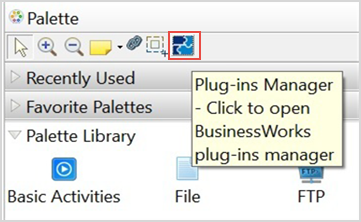
Optionally, click the
Plug-ins Manager button in the Palette section.
The
TIBCO BusinessWorks Plug-ins Manager dialog box opens, listing all the plug-ins available on the public update site.
On the
Options tab, select the
Show only installed plug-ins check box and select the plug-ins to uninstall.
Click
Uninstall.
The
Uninstall Details dialog box is displayed.
In the
Uninstall Details dialog box, review the components to uninstall.
To start the plug-ins uninstallation, click
Finish.

 button in the Palette section.