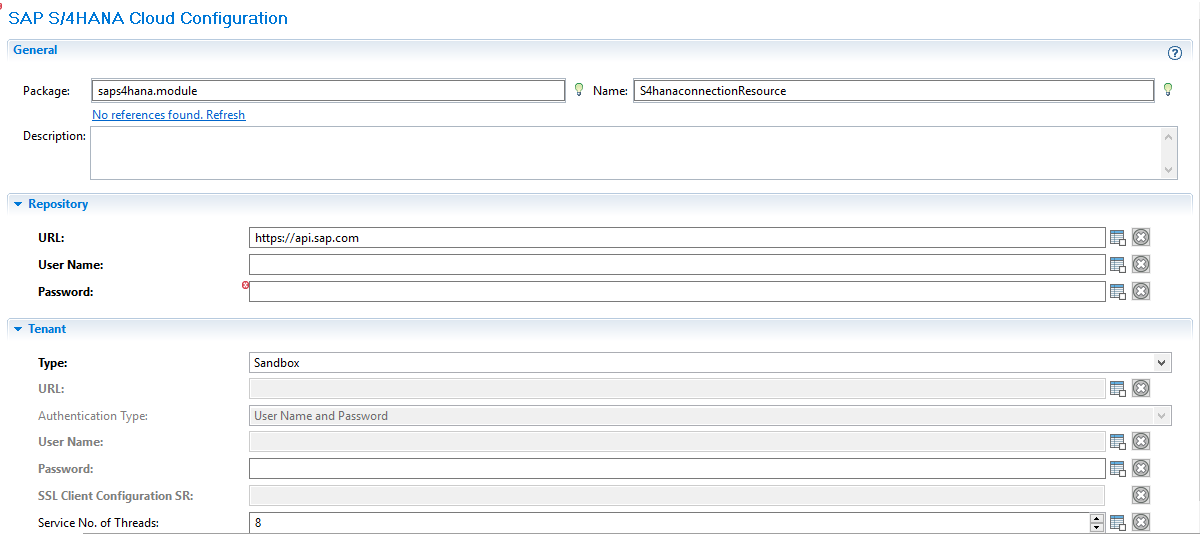
Creating and Configuring a SAP S/4HANA Cloud Connection
After creating a project, you can add an SAP S/4HANA Cloud Connection shared resource to establish connections between the plug-in and the SAP S/4HANA Cloud.
Prerequisites
The SAP S/4HANA Cloud Connection shared resource is available at the
Resources level. Ensure that you have created a project. See
Creating a Project for details.
Procedure
In the Project Explorer view, expand the created project.
Right-click the
Resources folder, and then click
New > SAP S/4HANA Cloud Connection to open the
SAP S/4HANA Cloud Connection wizard.
In the
New SAP Connection dialog, the resource folder, package name, and resource name of the SAP S/4HANA Cloud connection are provided by default. If you do not want to use the default configurations, change them accordingly. Click
Finish to open the SAP S/4HANA Cloud Connection editor.
Configure the connection properties available from the Configuration tab and click
Save.