Business Events
When configuring a project where Business Events need to be received from the SAP S/4HANA system, the configuration available in the Business Events tab must be maintained accordingly.
Note: Prior to configuring the Business Events tab, ensure that the database planned to be used is initialized accordingly using the initialization scripts provided in the plug-in tools folder. An initialization script is provided for each supported database.
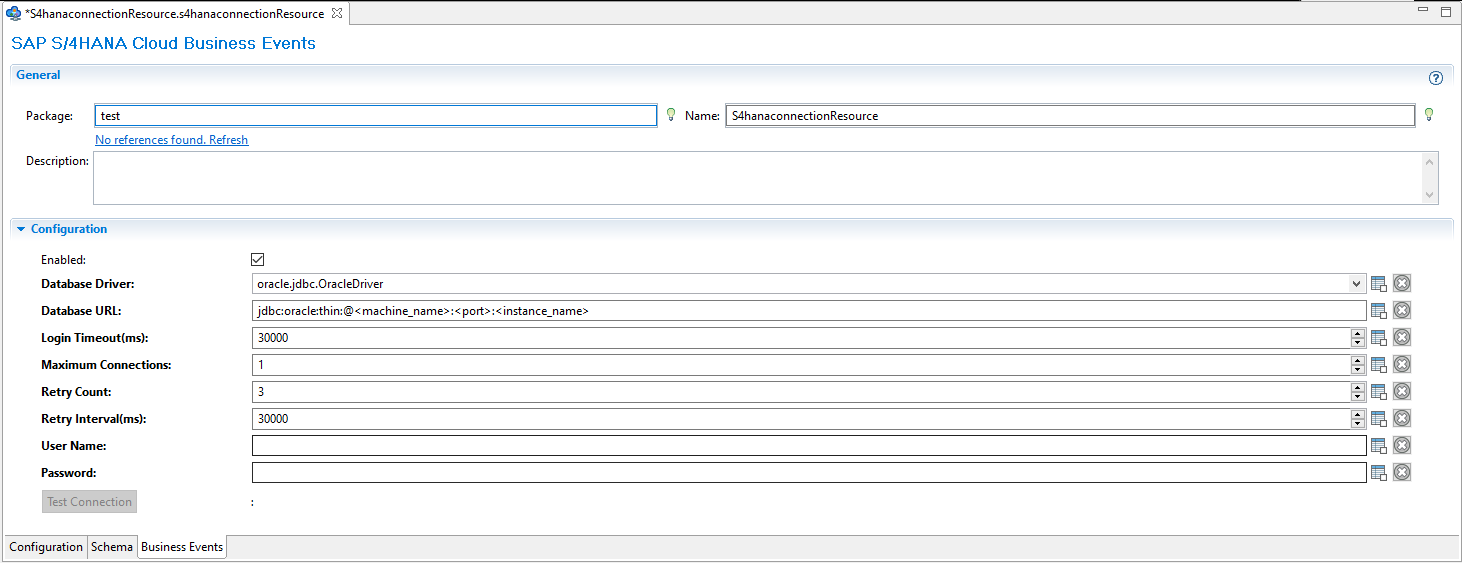
| Field | Module Property | Description |
|---|---|---|
| Database Driver | Yes |
The JDBC Driver. For supported databases, see the Read me. |
| Database URL | Yes | The URL of the database to be connected to store the event information. |
| Login Timeout | Yes | The timeout value in milliseconds for logging in to the database. The default value is 30000. |
| Maximum Connections | Yes | The maximum number of connections that the plug-in can use in the database connection pool. The default value is 1. |
| Retry Count | Yes | The number of times that the shared resource can retry to establish a connection with the database. The default value is 3. |
| Retry Interval | Yes | The time interval in milliseconds between two successive attempts to establish a connection with the database. The default value is 30000. |
| User Name | Yes | The valid user name used to log on to the database. |
| Password | Yes | The valid password corresponding to the user name. |