Running the Project
After importing the sample project, you can run the project to see how the plug-in works.
Prerequisites
Ensure that you have imported the sample project to TIBCO Business Studio as described in
Importing Sample Projects.
Procedure
-
In the Project Explorer view, expand the shared resource package.
-
Double-click SAPConnectionResource.sapconnectionResource
and configure them in the shared resources editor.
-
On the toolbar, click the Save icon (
 ).
).
-
To run the selected process, from the menu, click
.
-
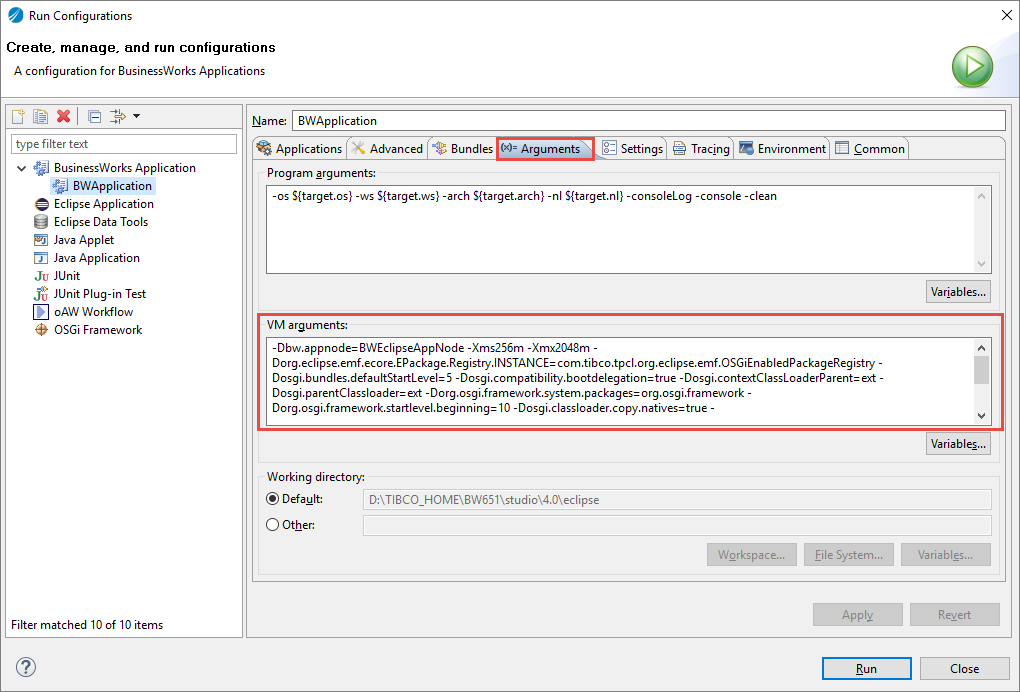
In the
Run Configurations dialog box, expand
BusinessWorks Application, and then click
BWApplication.
-
On the
Applications tab, all the sample applications are selected. You can clear the sample applications that you do not want to run.
-
Click
Run to run the process.
-
Click the
 icon to stop the process.
-
On the
Arguments tab, under
VM arguments panel, add the following property:
-Djavax.xml.stream.XMLInputFactory=com.sun.xml.internal.stream.XMLInputFactoryImpl
Copyright © Cloud Software Group, Inc. All rights reserved.