Configuring One-Way SSL Authentication
The SSL Server Configuration shared resource is used for receiving user event messages over HTTPS. In the one-way SSL authentication mode, the Microsoft SharePoint server authenticates the connected plug-in.
In the one-way SSL authentication mode, the plug-in passes its identity to the Microsoft SharePoint server.
- Procedure
- Expand the created project in the Project Explorer view.
- Right-click the
Resources folder and click
to open the SSL Server Configuration. Configure the information of SSL Server Configuration in the wizard.
The SSL Server Configuration editor is displayed.
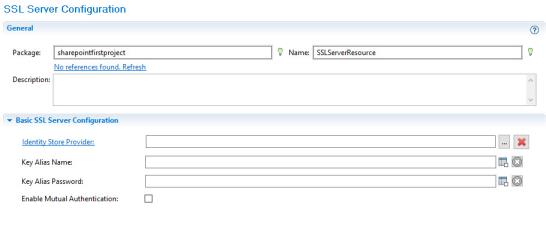
- In the
Basic SSL Server Configuration panel, configure the parameters.
- Identity Store Provider: a Keystore Provider resource that provides access to the keystore of the server. The plug-in accesses the keystore to load the certificate it will use to identify itself as the server during SSL agreement with the client.
If no identity Keystore Provider resource is available, click Create Shared Resource to create one. See Creating a Keystore Provider Resource for more details.
- Key Alias Name: the alias of the keystore
- Key Alias Password: the password of the keystore
Note: For the Keystore Provider resource, the generated keystore file in JKS format contains a valid certification that must be authorized by a third-party. - Identity Store Provider: a Keystore Provider resource that provides access to the keystore of the server. The plug-in accesses the keystore to load the certificate it will use to identify itself as the server during SSL agreement with the client.