User Interface Elements in the Siebel Connection Resource
The user interface elements, and their description, in the Siebel Connection resource are as follows:
Client Tab
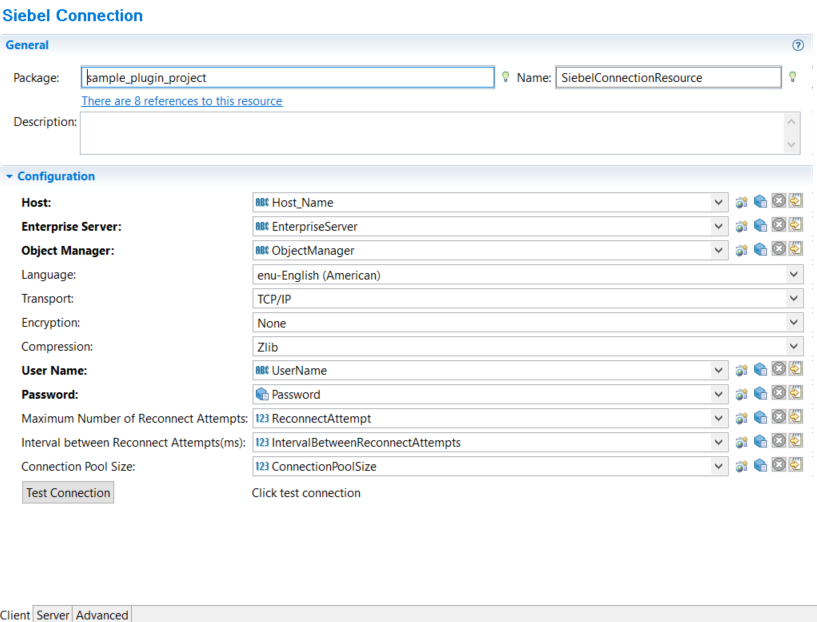
| Field | Description |
|---|---|
| Package | When you create a new Siebel Connection using the Siebel Connection Wizard, the value entered for the Package field will be displayed for this field. For details see the topic
Creating a Siebel Connection using the Siebel Connection Resource.
Note: The hyperlink that shows the count of Siebel Connection references, does not consider the reference that exists in the Siebel Objects Editor.
|
| Name | When you create a new Siebel Connection using the Siebel Connection Wizard, the value entered for the Resource Name field will be displayed for this field. For details see the topic
Creating a Siebel Connection using the Siebel Connection Resource.
Note: If the name of the Siebel Connection shared resource is changed, it does not get automatically updated in the Siebel Objects Editor.
|
| Description | Provide a description for the connection that is established. |
| Field | Visual Diff | Description |
|---|---|---|
| Host | Yes | The name, or the IP address, of the machine on which the Siebel server is installed. The format of the host name should be
<HostName or IP Address:Port Number>. For example,
MySiebelServerHost:7666.
|
| Enterprise Server | Yes | The Siebel Enterprise under which the Siebel Server is installed. |
| Object Manager | Yes | The name of the Application Object Manager that you want to access. This can be a user-defined component or one of the following predefined components: SCCObjMgr_enu, SSEObjMgr, ISSObjMgr, SSVObjMgr. For additional information, see the "Administration Guide of the Siebel Server". |
| Language | Yes | Select the language to be used while connecting to the Siebel application from the drop-down list. Some of the possible values are
enu,
chs,
cht,
csy, and
dan. You should provide the same value given at the time of the Siebel applications installation.
Note: Currently only
enu-English(American) is supported.
|
| Transport | Yes | The method of transport. Currently only TCP/IP is supported. |
| Encryption | Yes | Select whether encryption has to be performed or not. Encryption, if performed, will be done in the RSA method. The default value is None. To get connected in the RSA mode, you have to make the corresponding change in the Siebel Server setup. Additionally, your Siebel Setup should be capable of working in RSA mode. |
| Compression | Yes | Specify the type of compression that should be used for network communication. The default value is
ZLIB. When using Resonate, if compression is required on the client as well as the server side, it must be specified for the client as well as the server side. The server, and the client, will compress the communication as defined by you. If you do not use Resonate, the server drives the compression and the client-side settings will be ignored.
|
| User Name | Yes | Specify the username for the account to access the application. For example, sadmin. |
| Password | Yes | Specify the password for the account to access the application. |
| Maximum Number of Reconnect Attempts | Yes | Specify the maximum number of reconnect attempts that should be performed in case of temporary or permanent network failure. The default value is -1 and it indicates that the reconnect attempt will be indefinite. |
| Interval between Reconnect Attempts(ms) | Yes | Specify the interval between reconnect attempts (in milliseconds).
Note: This time does not include the time required by the API.
|
| Connection Pool Size | Yes | Specify the maximum number of Siebel JDB Connections that are created for performing the inbound operation.
The default value is 1. Note: The summation of the value of Connection Pool Size from
Client tab and the value of Number of Connections to Siebel from the
Server tab, must be less than or equal to the pool size declared in
siebel.properties file for Siebel Java data bean.
|
| Test Connection | No | A button, when clicked, checks the connection between the plugin and the Siebel server. |
Server Tab
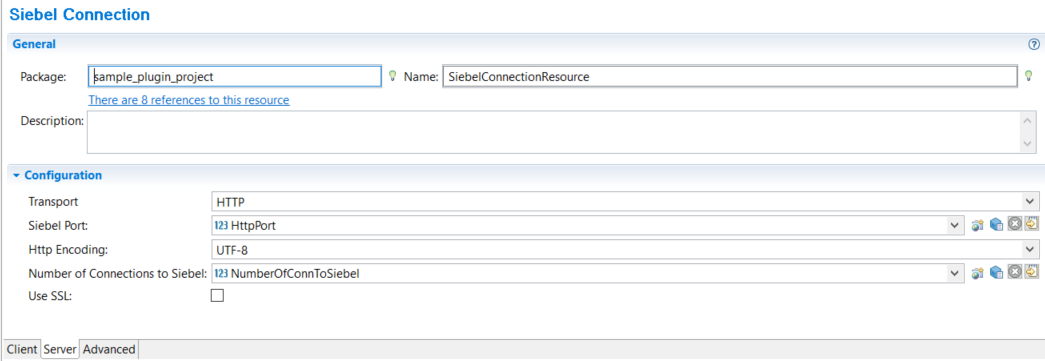
All the parameters mentioned in the Server tab are used for the outbound operation.
| Field | Visual Diff | Description |
|---|---|---|
| Siebel Port | No | The number of the port on which the plugin listens for the outbound requests.
Note: As Outbound event listens on this port you cannot deploy the same application EAR file in different appnode on the same host.
You can deploy it in another appnode on different machine and that is an independent application. |
| Http Encoding | No | Specify the language encoding being used by the Siebel deployment. This parameter is used by the plug-in in outbound scenarios only. The plug-in uses this value for processing the HTTP requests from the Siebel application.
Note: Only UTF-8 is supported.
|
| Use SSL | No |
Check this checkbox to enable secure communication. If checked, the outbound requests use the HTTPS protocol for secure communication between the Siebel server and the plug-in. HTTPS is configured at the instance level. Once you check the option, you must configure the BW shared resource SSL Server Configuration. This SSL Server Configuration requires the Keystore, refer to the BW user guide for more details. This step also requires the certificate. Refer to the steps below to create a certificate. This same certificate must be configured at the Siebel Server end. The default value for Use SSL is unchecked. Note:
You can generate a certificate using the Keytool utility. The following command is used to create a certificate: keytool -genkey -keystore KeyStore_Name -keyalg rsa -alias Alias_Name -storepass KeyStore_Password -keypass Key_Password Where,
While generating a certificate, the first name and the last name must be the IP address or host name of the machine on which the Siebel plugin is running. The following fields are supported from
The following fields are supported from
Note: Mutual Authentication and verify remote host name are not supported.
|
| Number of Connections to Siebel | No | The default value is 1.
This shows the maximum number of Siebel JDB Connections that are created for performing the outbound operation. Note: The summation of "Connection Pool Size" value from the
Client tab and "Number of Connections to Siebel" value from the
Server tab, must be less than and equal to the pool size declared in the
siebel.properties file for Siebel Java data bean.
|
Advanced Tab
| Field | Visual Diff | Description |
|---|---|---|
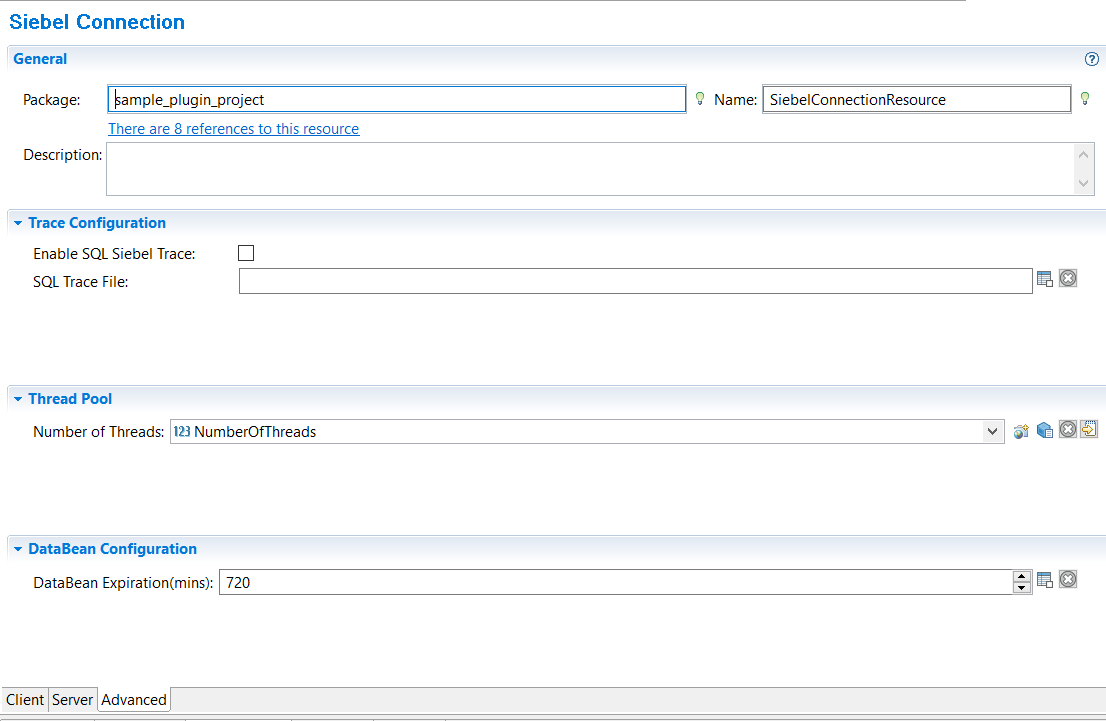
| Enable SQL Siebel Trace | No | Select this check box if you want to enable SQL Siebel trace. |
| SQL Trace File | No |
Provide the name of the Log file to store the SQL trace. The log file will get generated at the Siebel server. This property controls the number of concurrent threads used for invoking the inbound activities of Siebel plug-in. |
| Number of Threads | No | Specifies the number of threads in the thread pool provided by Siebel Connection Shared Resource.
This property controls the number of concurrent threads used for invoking the inbound activities of Siebel plug-in. The default value is 8. |
| DataBean Expiration (mins) | No |
This property controls the connection (Siebel Java data bean) expiration time. It is useful for long running applications to improve memory utilization. After the specified time, the connection (Siebel Java data bean) is logged off and removed from the connection pool. The default value is 720. |