MT Message
The SWIFT MT messages start with the letters MT followed by a 3-digit number. The first digit represents the message category, the second digit represents a group of related parts in a transaction life cycle and a third digit represents the message type.
MT Message Types
SWIFT MT messages include the following types:
MT1nn through
MT9nn is the User to User message representation.
MT Message Structure
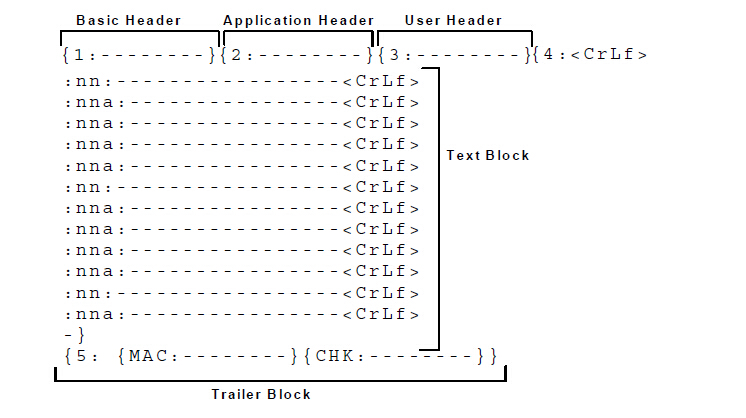
All SWIFT MT messages are ASCII text messages that have the following structure:- Basic header block
{1:} represents the Basic header block. This includes details, such as the application ID, service ID, address of the logical terminal, session number, sequence number, and so on. The application ID in this block helps you identify whether a message is a GPA message (system message) or an MT message (user to user message). For example, ’M’ indicates that the message is an MT message and ’A’ indicates that the message is a GPA message.
- Application header block
{2:} represents the Application header block. Application headers contain two types: input and output. The structure of the block varies depending on the type of the application header. This header block typically includes details, such as the message type, message priority, delivery monitoring, and so on.
- User header block
{3:} represents the User header block. The block includes details, such as the banking priority code and so on. This is an optional block.
- Text block
{4:} represents the Text block. This block contains the actual MTnnn message. This block includes details, such as the ordering customer, beneficiary customer, amount, currency code, date, and so on. This block consists of field tags of the
format:nna:wherennis a number andais an optional letter, which might be present on selected tags. The symbol CrLf is a control character and it represents Carriage Return or Line Feed. The symbol CrLf is a mandatory delimiter in this block. - Trailer block
{5:} represents the Trailer block and a message always ends in a trailer block. It is used for control purposes and includes details, such as message authentication code and checksum calculated for all the message types.
The following figure is a graphical representation of a typical SWIFT MT message: