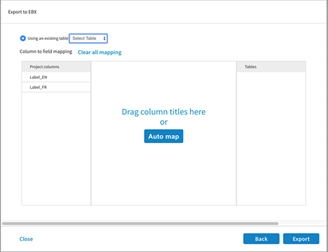
You can export project data to EBX as existing business objects or new business objects.
Procedure
On the project data page, click
Export > To EBX.
Select how you want to connect to EBX:
If you want to use an existing connection, select a connection from the
Saved connections list.
If you want to create a connection to EBX, select
Create new connection from the
Saved connections list.
In the
EBX URL field, enter the URL of the EBX Server that you want to connect to.
In the
User name and
Password fields, enter your user name and password used to connect to the EBX Server.
In the
Login timeout (sec) field, specify a timeout interval in seconds.
The default value is 10.
In the
DataSpace field, enter the value of the DataSpace.
In the
DataSet field, enter the value of the DataSet.
In the
User name and
Password fields, enter your user name and password used to connect to the EBX Server.
If you want to save the connection, keep the
Remember me check box selected. Otherwise, clear this check box.
Click
Connect.
The Export to EBX dialog is displayed when a valid connection is established.
From the
Using an existing table list, select a table.
Do one of the following:
Click
Auto map
From the Proejct Columns and Tables fields, drag and drop the required column titles. Ensure that you have mapped all the required attributes.
To erase your previous selection, click
Clear all mapping
Click
Export .
If the records are successfully exported, a relevant message is displayed. If the operation fails, the failed records index and the reason is displayed.