Clarity API Tutorial
This tutorial explains how to run a batch process/job on a different VFS data source and download the results to a desired VFS destination by invoking a set of Clarity APIs.
Ensure that the data structures of the source file in TIBCO Clarity and the source file on which you want to perform the batch job/process in VFS are the same.
Take the Sample_students_records dataset as an example. There is a file named vfs_student_records on an FTP server. The file has the same data structure as the data source file used in the Sample_students_records dataset.
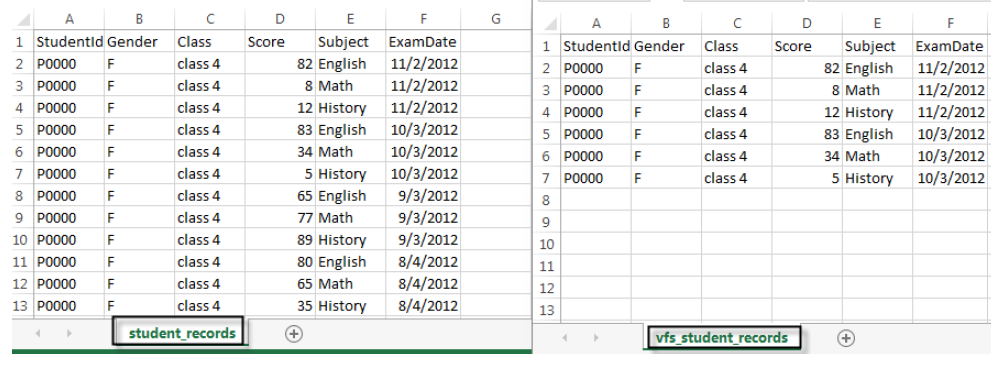
By invoking Clarity APIs, the batch operations performed on the Sample_students_records dataset can be applied to the vfs_student_records file on the FTP server.
- Procedure
- Click the project of the student_records dataset.
- On the project data page, double-click the Class column and change the column name to Class Number.
- Click .
- Click
workspace and select the
get metadata of all projects and all datasets in user workspace operation. Click
Try it out.
In the Response Body area, you can find the dataset ID of the student_records dataset is 138382664536900 and the project ID of the project where you rename a column is 147382664541631.
- Click
batch and select the
Set source file used in batch job, must be apache VFS format operation. Configure the API parameters and click
Try it out.
dataset: 138382664536900source: students_records_new.csvnew_value: http://54.227.201.75/vfs_student_records.csvThe response status is OK if the source file format is correct.
- Click
batch and select the
Set Batch job result destination, must be apache VFS format operation. Configure parameters and click
Try it out.
dataset: 138382664536900new_value: ftp://test:test@54.227.201.75/batch_resultThe response status is OK if the destination file is accessible.
- Click
batch and elect the
Start a new batch job operation in the batch group. Configure the API parameters and click
Try it out.
dataset: 138382664536900project: 147382664541631
The process/job ID is displayed in the response body.
- Click
batch and select the
Query one batch process using batch processId operation. Configure the API parameters and click
Try it out.
dataset: 138382664536900processId: batchProcess_1401181078549The job status becomes success when the batch job finishes successfully.
- Select the
Download batch job result file according to processId operation in the batch group. Configure the API parameters and click
Try it out.
dataset: 138382664536900processId: batchProcess_1401181078549The status is OK when the batch job result is downloaded to the destination successfully.
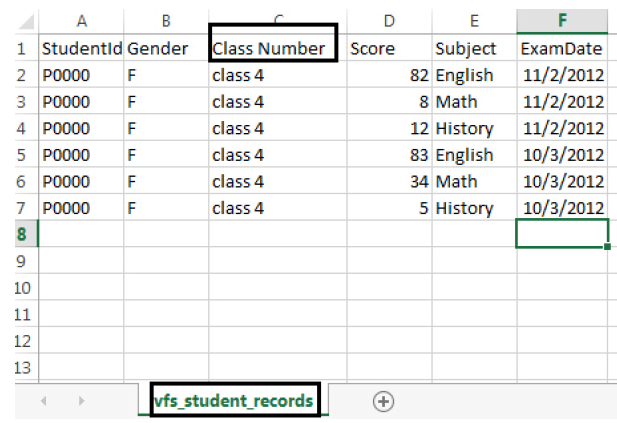
Go to the FTP server where the vfs_student_records file is located, and open the file. As shown, the column Class is changed to Class Number.