Copyright © Cloud Software Group, Inc. All Rights Reserved


Chapter 3 Adapter Resources Palette : Folder Reference

Folder Reference
This section is a reference to the folders used by TIBCO Designer. The section is mostly meant for online help access. It discusses folders used by the Generic Adapter Configuration.
Overview
By default, TIBCO Designer provides a number of folders as a part of every adapter configuration. These folders provide easy, organized access to every configurable adapter feature.
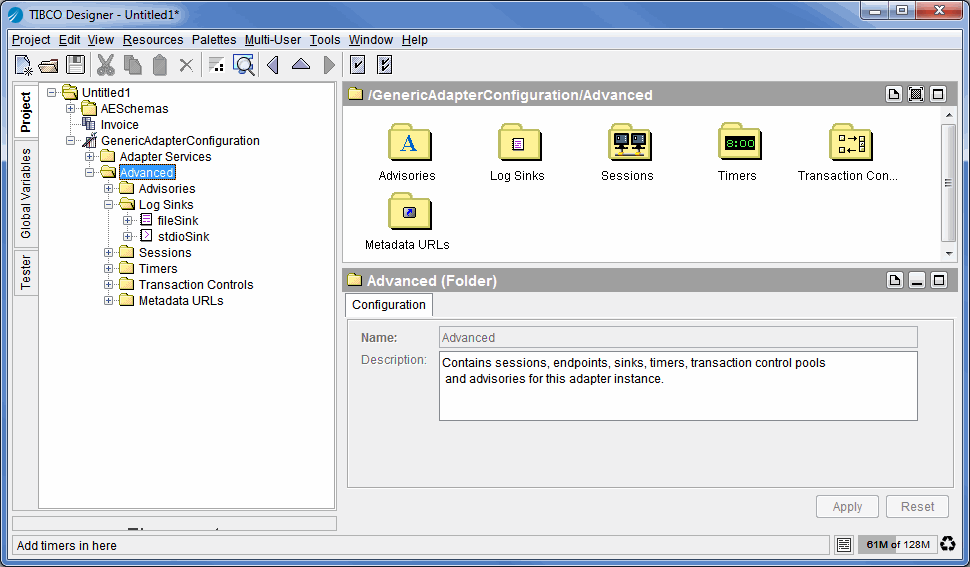
Figure 106 shows the layout of the default folders.
Figure 106 TIBCO Designer Generic Adapter Configuration Default Folders
Adapter Services Folder
The Adapter Services folder is part of every adapter configuration. It is the starting point for configuration. You select services and drag them into the design panel, then configure the services in the configuration panel. See the online help for the individual services for additional information.
Each time you configure a service, TIBCO Designer creates the corresponding session and endpoint in the Advanced folder.
Advanced Folder
The Advanced folder is part of every adapter configuration. It contains resources that are created by TIBCO Designer while the adapter developer configures the adapter. The folder can include sessions, endpoints, advanced logging and so on. The configuration of these resources can be changed for situations that require custom settings.
In most situations, adapter developers configure the resources in the Adapter Services folder. They may then access the resources in this folder for certain custom configuration.
Log Sinks Folder
The Log Sinks folder stores log sinks for an adapter.
You have two options for specifying logging for your adapter:
For basic logging, use the Logging tab for the adapter instance. See Logging Tab for information. If you are using this Generic Adapter Configuration to configure an already existing adapter that was loaded into it, your adapter may include additional logging information.
For advanced logging, click Use Advanced Logging, in the adapter’s Advanced Logging tab, then specify log sinks in the Log Sinks folder. See , Custom Log Sink Reference.
Sessions Folder
The Sessions folder stores sessions and endpoints associated with an adapter’s services.
When you specify services for an adapter, TIBCO Designer creates the corresponding sessions and endpoints. You can then edit the sessions and endpoints in this Sessions folder if customization not available for the service is required. See , Sessions Reference and , Custom Log Sink Reference.
Timers Folder
The Timers folder stores timers for an adapter.
If you configure an adapter for which a palette is predefined, and timers are available for this adapter, they are included in this folder.
If you configure a custom adapter, you create timers explicitly. See Timer.
Transaction Controls Folder
The Transaction Controls folder stores transaction controls for an adapter.
If you configure an adapter for which a palette is predefined, and transaction controls are available for this adapter, they are usually one of the services you work with.
If you configure a custom adapter, you create timers explicitly. See Transaction Controls.
Advisories Folder
The Advisories folder stores advisories for an adapter.
If you configure an adapter for which a palette is predefined, and advisories are available for this adapter, they are usually one of the services you work with.
If you configure a custom adapter, you create timers explicitly. See Advisories.
Metadata URLs Folder
By default, an SDK-based adapter loads all metadata upon startup. This is the recommended behavior.
If your adapter needs an extraordinary amount of time to load all metadata, you may specify a metadata URL. The adapter will then load only those metadata to which the URL points
Load URL Resource
The Load URL resource allows you to specify a directory that the adapter will search for schema classes upon startup.

Copyright © Cloud Software Group, Inc. All Rights Reserved