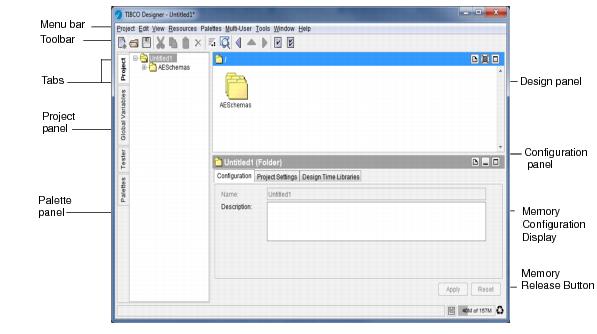
Figure 3 illustrates the TIBCO Designer window.
A project contains resources that implement the enterprise integration. This includes services (producers and consumers of information), any business logic that may be applied to that information, and deployment information.
By default, the project panel allows you to view the Project Display or
Global Variables Display. When used in conjunction with other projects, the panel can be used for other purposes, for example, in conjunction with the TIBCO ActiveMatrix BusinessWorks tester.
With the Project tab selected, the project panel displays the project tree. This includes the top-level (root) folder and the hierarchy of resources. The hierarchy of folders and resources corresponds to the hierarchy of folders and files in the project folder.
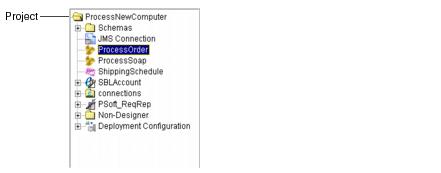
Figure 4 illustrates an example project,
ProcessNewComputer, in the project panel. Multiple TIBCO products were used to create the integration project: it contains two TIBCO ActiveMatrix BusinessWorks process definitions (
ProcessOrder and
ProcessSoap) and a Siebel adapter (
SBLAccount).
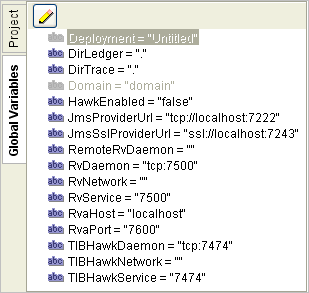
Global variables are associated with each project. To display them, click the Global Variables tab of the project panel. Clicking the pencil icon displays the global variable editor. See
Working With Global Variables for more information.
Resources are the components of a project. A simple TIBCO Designer resource corresponds to an object in a TIBCO application, such as an adapter configuration, an adapter service, a process definition, or an
FTP activity.
Palettes organize resources and allow you to add them to your project. You select resources in the palette panel and drag and drop them into the design panel to add them to your project.
After you have added the configuration information, you must click the Apply button
for each tab. If you decide you do not want to add the configuration information, click
Reset before you apply any changes to return to the previous values for each field in the tab.




 in the top right corner of the configuration panel for online help on the current selection.