Copyright © Cloud Software Group, Inc. All Rights Reserved


Chapter 3 Working with a Revision Control System : Scriptable RCS Adapter

Scriptable RCS Adapter
The scriptable RCS adapter allows you to integrate RCS environments not directly supported by TIBCO Designer into TIBCO Designer. The scriptable RCS adapter enables you to perform any required RCS operations in TIBCO Designer based on a custom script or program that you provide. The level of RCS integration with TIBCO Designer is flexible and can be suited for your business and project management needs.
The scriptable RCS adapter is simply a pass-through adapter. This means that the scriptable RCS adapter forwards RCS operation requests from TIBCO Designer to a script. To accomplish this level of integration the scriptable RCS adapter imposes a protocol (or interface) on RCS interactions that defines the arguments the script receives and what it is expected to return as results. It also means that the scriptable RCS adapter is subject to any limitations imposed by TIBCO Designer on the way that it uses RCS systems.
The scriptable RCS adapter communicates with your program by calling your script with specific arguments as defined by the scriptable RCS adapter protocol. In response to a request your script performs an operation that returns a response (by sending text to stdout). The response is parsed by the scriptable RCS adapter and displayed to the user in some specified way.
If your script does not use an RCS API, but forwards requests to an RCS system, it must perform extensive parsing of the output sent by the system and return output to the scriptable RCS adapter as specified later in this section. The language used to write your script has a significant impact on the complexity of the script.
Execution Environment
The script is typically called with a single argument indicating the command or action to be performed by TIBCO Designer. Commands that provide additional arguments to the script are indicated in the commands description (See the following sections).
Some RCS operations such as add, delete, and commit typically require a user comment. In such cases, the argument -comment is provided, followed by a quoted string indicating the text provided by the user. The general description of the host script is:
script command [-comment 'some text']
On execution, the script's current working directory is set to the TIBCO Designer project's root folder. Any file arguments required by an operation are passed using the standard input stream (stdin) of the script. All file paths are fully qualified. If the RCS system requires paths to be relative, the script implementation can remove the current working directory from the path provided.
If the requested operation returns a value, the value is passed using standard output (stdout) as text. If a command requests the return value to be true or false, the script will echo or print the textual value of the word true or false to stdout.
The exit value for the script should be zero (0) for normal or successful completion. If there's an error, the script can return a non-zero exit code, and write a message to standard error (stderr). In response to non-zero exit codes, TIBCO Designer displays the output found in stderr in a dialog.
User Authentication
The scriptable RCS adapter doesn't provide a mechanism to authenticate to a tool. The script can choose from a number of standard ways of storing usernames and passwords that match the security goals of your organization. It is recommended that you use the method provided by your RCS system to store usernames and passwords.
Special Files
There are two files that your script should be aware of:
These files are important to scriptable RCS adapters that require parent directories to be registered with the RCS system [such as Subversion (SVN) or CVS]. If your system implicitly manages directories based on whether files are added or deleted, you can probably safely ignore these files and handle them as you would any other file in a project.
If your system requires special handling of directories, the add and delete operations must handle the parent directory as well. TIBCO Designer does not issue RCS commands for directories so these files also serve as parent directory notifications.
As can be inferred, an add operation involving these files also implies an add operation for the parent directory. A delete operation implies a delete of the file followed by a delete of the parent directory.
There are two general categories of commands sent by the scriptable RCS adapter: configuration commands and RCS Commands. The next section explains configuration commands. See page 77 for an explanation of RCS commands.
Configuration Commands
To provide better integration and flexibility, the scriptable RCS adapter sends several configuration commands to the script. These commands must return additional information that modifies how TIBCO Designer interacts with the scriptable RCS adapter and your script implementation.
The configuration commands are given in the next table.
Scripts should return true if the RCS system requires directories to be in editable or checked-out mode before items can be added or deleted from the directories.
This callback command implements restrictions on the editing and reverting of TIBCO Designer resources that are nested in folders. When the command is configured to true, TIBCO Designer requires that all folders leading to the desired resource be unlocked for editing. Similarly, when reverting, all folders containing the resource will be reverted and locked together.
This command returns true if your script can commit changes. If false is returned, the commit feature in TIBCO Designer is disabled and you must use your RCS system to commit your work.
If the script returns true to this query and the file is locked, a user cannot edit the file unless the TIBCO Designer Acquire-Checkout command is applied to the resource in question. In response, TIBCO Designer sends the edit command to the script to perform the unlocking. Similarly, if the script returns true, revert operations will only be available when the resource is unlocked.
This command is also required to return true even for RCS systems that don't enforce locking. The example SVN implementation (see page 80 ) returns true. This allows the system to revert, but TIBCO Designer will consider all files to be checked out.
If the script returns true, and a user selects a container, the interpretation will edit or revert all contents. The scriptable RCS adapter forwards such requests as editRecursively or revertRecursively.
If the script returns false, TIBCO Designer calls the scriptable RCS adapter (and your script) once per file and performs the recursion for you. In most cases the recursive operation performed by the script is much faster than recursion implemented by TIBCO Designer.
This command is designed to be sent early on scriptable RCS adapter activation to determine if TIBCO Designer should enable its Synchronzie Project command. However, it is currently not supported by the scriptable RCS adapter. All the scripts return false to this request. The action to synchronize the project is disabled.
If the script returns true TIBCO Designer will prompt for user comments when performing an add operation.
RCS Commands
The RCS commands listed in the following table represent the RCS operations that are supported by TIBCO Designer. These commands are sent to your script based on user interaction with a TIBCO Designer project. The scriptable RCS adapter forwards the following commands from TIBCO Designer to the RCS system.
This command adds a file to an RCS adapter. The command can be accompanied by the -comment flag followed by a quoted text message if the script returns true to wantsCommentsOnAdd.
This command submits all changes in the project to the RCS adapter. The command is accompanied by the -comment flag and a string typed by the user. If the commit fails due to out-of-date files or merge errors, the native RCS tools will be used to revert or integrate the changes.
It is recommended that the commit implementation perform a release of configurations that were unlocked, but were not edited prior to the commit running. This removes files that show as having been edited in the RCS system when, in fact, they never changed.
Returning false from supportsCommit disables this call.
The command is followed by the flag -comment and a user-entered comment. Depending on the RCS system, this comment may not be registered with the system because the edit may require a commit. In such cases it is safe to ignore the comment because it will be supplied during commit.
This command is only sent when the script responds to supportsLocking with true and a file is locked in the file system. This means that RCS systems that do not lock files won't ever receive edit commands, because the files will never be read-only to the scriptable RCS adapter. When sent, the scriptable RCS adapter should issue an edit or checkout command for the file to put it into the appropriate edit mode and make it writable by the user.
The status command returns true or false on stdout. The scriptable RCS adapter caches this information for the session unless the file is deleted from the project. After the file has been deleted, the request can be made again after the file is added back to the project.
This command is sent in response to the user unlocking the file. In TIBCO Designer this means to abandon changes on the file and release it so other users can edit the file. The file will revert back to its initial contents.
Example Script Implementation
An example script for the scriptable RCS adapter follows. The script shows an integration with SVN for UNIX systems. The implementation is in Ruby.
There are two global variables in the script that must be defined to point to the correct locations on your system. They are as follows:
SVN. Points to the location of the Subversion revision control system directory.
SVN_LOG_FILE. Points to the location of the log file for the RCS system.
#!/usr/local/bin/ruby
 
# THIS CODE IS SAMPLE QUALITY CODE TO ILLUSTRATE INTERACTION BETWEEN THE
# SCRIPTABLE RCS ADAPTER AND TIBCO DESIGNER. SUITABILITY OR FITNESS FOR ANY
# OTHER PURPOSE IS NOT GUARANTEED NOR SUPPORTED.
 
 
# DEBUG TIP - save input/output to a file. In TIBCO Designer define the
# java property -DDEBUG_RCS_CMD=true, this will print the inputs and
# outputs of the process call.
 
# Some 'global' variables. Scripts that are deployed should probably
# obtain their configuration information from a file.
$SVN = "/opt/CollabNet_Subversion/bin/svn"
$SVN_LOG_FILE = "/home/tra/work/tmp/svnadapter.txt"
 
# A method to write errors to the stderr. It is more friendly as it
# provides context information from the script.
def logerr(message)
m = caller.first
$stderr.puts "#{m}: #{message}"
end
 
# A method to log messages to a file
def debug(message)
if($SVN_LOG_FILE != nil)
out = File.open($SVN_LOG_FILE, "a")
m = caller.first
out.puts "#{m}: #{message}"
out.flush
out.close
end
end
 
# returns the filename passed via stdin or nil if none
def getFileName()
filename = nil;
if $stdin.closed?
logerr("stdin is closed")
elsif $stdin.eof?
logerr("stdin reached eof!")
else
filename = $stdin.readline.chomp
end
 
return filename;
end
 
# Callback to return a list of files that should be ignored by TIBCO Designer
# for svn these are the '.svn' directories. TIBCO Designer will not show these
# files in the project. Return one file name per line, when specifying
# directories, TIBCO Designer will not traverse them, so no need to ommit names
# inside of ignored directories.
def specialVFileNames
$stdout.puts ".svn"
exit(0)
end
 
# Callback to return whether the RCS system supports file locking.
# For SVN this doesn't quite work because files are always writable.
# From the Svn's adapter perspective ALL files are always checkedout.
# If we return false, revert action is disabled.
# a lock.
def supportsLocking
$stdout.puts "true"
exit(0)
end
 
 
# The RCS integration infrastructure doesn't call this method unless you
# return true from supportsLocking AND the file is locked as read-only
# on the file system. SVN doesn't lock files in the file system so this
# method will never be called.
def edit()
exit(0)
end
 
def editRecursively(folderPath)
logerr("Non supported operation!")
exit(1);
end
 
# SVN requires that the folder containing a file added to revision control
# be under revision control. We use this to check for the existance of
# a ".svn" directory as this is a cheap check.
def can_add(path)
retVal = false
svnpath = nil
if(File.directory?(path))
svnpath = File.join(path,".svn")
elsif(File.file?(path))
dir = File.dirname(path)
svnpath = File.join(dir, ".svn")
end
return svnpath.nil? ? false : File.exist?(svnpath)
end


# Actual implementation to add files. Folders and substitution
# variables are treated similarly, because groups in substitution
# variables are just folders with additional '.substvar' files.
def do_add(path)
retVal = false;
fn = File.basename(path)
if(fn == ".folder" || fn.index(".substvar") != nil)
dir = File.dirname(path)
svnpath = File.join(dir, ".svn")
if(File.exists?(svnpath) == false)
parent = File.dirname(dir)
svnpath = File.join(parent, ".svn")
if(File.exists?(svnpath))
process = IO.popen("#{$SVN} add --non-recursive \"#{dir}\"", "r")
line = process.readline
unless line.nil?
if(line.index("A") == 0)
retVal = true
end
if(retVal == false)
logerr("#{line}")
end
end
end
end
end
if(can_add(path))
process = IO.popen("#{$SVN} add --non-recursive \"#{path}\"", "r")
line = process.readline
unless line.nil?
if(line.index("A") == 0)
retVal = true
end
if(retVal == false)
logerr("#{line}")
end
end
else
logerr("Unable to add #{path} to svn. The file is not in an svn managed directory.")
end
return retVal
end
 
# This is the method that we dispatch 'add' file requests
def add(file)
retVal = false;
if(file == ".folder")
if(do_add(File.dirname(file)))
retVal = do_add(file)
end
else
retVal = do_add(file)
end
exitCode = retVal ? 0 : 1;
exit(exitCode);
end
 
# Actual method that deletes things
def do_delete(file)
retVal = false
process = IO.popen("#{$SVN} delete --force \"#{file}\"", "r")
line = process.readline
unless line.nil?
if(line.index("D") == 0)
retVal = true
end
if(retVal == 1)
logerr("returned #{line}")
end
end
 
return retVal
end
 
# This is the method that we dispatch 'delete' path requests
# Check that the file really needs to be removed from RCS
def delete(comment)
retVal = false;
file = getFileName()
inrcs = do_isRevisionControlled(file);
if(inrcs)
retVal = do_delete(file)
if(retVal)
retVal = do_commit(file, comment)
end
end
if(retVal && inrcs)
fn = File.basename(file);
if(fn == ".folder" || fn.index(".substvar") != nil)
dir = File.dirname(file)
retVal = do_delete(dir)
if(retVal)
retVal = do_commit(dir, comment)
end
end
end
return retVal || inrcs ? 0 : 1
end
 
# This method returns the status of the project directory
# If there's nothing to check in we set the stderr with a
# message. The exit code of 1, will be interpreted as an error
# and TIBCO Designer will raise a Dialog.
def commitPreview()
retVal = 0;
cwd = Dir.getwd;
 
process = IO.popen("#{$SVN} status #{cwd}", "r")
lines = process.readlines
line = lines.join
if(line.length == 0)
$stderr.puts "Nothing to check-in!"
retVal = 1
else
$stdout.puts "#{$SVN} status #{cwd}:\n" << lines.join
end
exit(retVal);
end
 
# If the user provided a file, then TIBCO Designer had a selection. Only
# commit that file. Otherwise the entire project. Because SVN keeps
# track locally, we auto-commit deletions to try and clean up directories
# that are being deleted, in these cases we pass a specific file.
def do_commit(path, comment)
retVal = false
if(comment == nil || comment.length == 0)
comment = "[no comment supplied]"
end
process = nil
if(path.nil?)
process = IO.popen("#{$SVN} commit --non-interactive -m \"#{comment}\"", "r")
else
process = IO.popen("#{$SVN} commit --non-interactive -m \"#{comment}\" \"#{path}\"", "r")
end
lines = process.readlines
line = lines.join("\n")
 
if(line != nil && (line.index("Committed revision") != nil || line.index("Deleting") == 0) || line.length == 0)
retVal = true
end
if(retVal == false)
logerr(line)
end
return retVal
end
 
# The commit driver
def commit(comment)
exit(do_commit(nil,comment) ? 0 : 1);
end
 
# Performs an svn update recursively or for a single file depending on the
# user selection. Since svn will merge or create conflict files we interpret
# those as errors. A production version of a script would probably want to
# preview the update, and if there are conflicts or merges prevent the update.
# This way the user has a chance of reverting changes. Such implementation is
# left as an exercise.
def update(filename)
foundError = false
recurse = (filename == ".folder" || filename.index(".substvar") != nil)
 
inrcs = do_isRevisionControlled(filename)
if(inrcs)
process = nil
if(recurse)
process = IO.popen("#{$SVN} update --recursive \"#{filename}\"", "r")
else
process = IO.popen("#{$SVN} update \"#{filename}\"", "r")
end
lines = process.readlines
lines.each do |line|
status = line[0,1]
if(status == "C" || status == "G")
foundError = true
end
end
if(foundError)
$stderr.puts(lines)
end
end
 
exit(foundError ? 1 : 0)
end
 
 
def revertRecursively(folderPath)
logerr("Non supported operation!")
exit(1);
end
 
# Implementation of revert
def revert(filename)
retVal = false;
recurse = (filename == ".folder" || filename.index(".substvar") != nil)
inrcs = do_isRevisionControlled(filename)
if(inrcs)
process = nil
if(recurse)
process = IO.popen("#{$SVN} revert --recursive \"#{filename}\"", "r")
else
process = IO.popen("#{$SVN} revert \"#{filename}\"", "r")
end
lines = process.readlines.join("")
if(lines.length == 0 || lines.index("Reverted") != nil)
retVal = true;
else
$stderr.puts(lines)
end
else
retVal = true;
end
exit(retVal ? 0 : 1)
end
 
# implementation of info
def info(filepath)
svndir = File.join(File.dirname(filepath),".svn")
if(File.exists?(svndir))
process = IO.popen("#{$SVN} info \"#{filepath}\"", "r")
$stdout.puts process.readlines
else
$stdout.puts "#{filepath} is not in a svn manged directory"
end
exit(0);
end
 
# This callback controls whether folders require a
# recursive lock. If this returns true, a revert will trigger
# a recursive revert going up the project tree. Svn can revert
# individual files or folders.
def foldersRequireRecursiveLock()
$stdout.puts("false")
exit(0)
end
 
# This method is probably the most important and most frequently called.
# The results are cached by the ScriptableAdapter host. Essentially this
# tells TIBCO Designer whether the file is under revision control or not.
# Caution: TIBCO Designer WILL ask about child files that are in a container that
# is not revision controlled! Other methods call this to determine wether
# they should do any work or not.
def do_isRevisionControlled(filepath)
retVal = true
svndir = File.join(File.dirname(filepath),".svn")
if(File.exists?(svndir) == false)
logerr("The directory containing #{filepath} is not under svn control.")
retVal = false
elsif(File.exists?(filepath))
process = IO.popen("#{$SVN} status \"#{filepath}\"", "r")
lines = process.readlines
line = lines[0]
if(line != nil && line.index("?") == 0)
retVal = false;
end
else
# not yet on disk...
retVal = false;
end
return retVal
end
 
# The driver for status
def isRevisionControlled(filepath)
status = do_isRevisionControlled(filepath)
$stdout.puts status
exit(0)
end
 
#The Script always returns false to this command. All updates must be performed using the RCS's tools
def supportsSynchronize()
$stdout.puts "false"
exit(0)
end
 
def foldersRequireLockForParentWritability()
$stdout.puts "false"
exit(0)
end
 
# Let TIBCO Designer recurse it for us. Returning true from here
# could improve performance for some edit/revert operations
# at the expense of implementing recursive
def supportsRecursiveLock()
$stdout.puts "false"
exit(0)
end
 
# if true, TIBCO Designer will ask for comments on add
def wantsCommentOnAdd()
$stdout.puts "false"
exit(0)
end
 
# if false, TIBCO Designer won't allow commits via the RCS adapter
def supportsCommit()
$stdout.puts "true"
end


# This tells ruby, that this is only executable if the name
# of the program matches the file.
if __FILE__ == $0
 
require 'getoptlong'
# The script will be called with 1 or 3 arguments. The first argument
# is the name of the command. If TIBCO Designer collected a comment, the
# the option '-comment' is passed along with a quoted string. Depending
# on the script or RCS system, that comment may or may not be usable.
# The name of the file to operate on is passed via stdin. Currently
# rcs adapters only pass one file at a time.
# extract the command $* is the argv in ruby
command = $*.shift
# see if we have a comment flag, if we do extract the comment.
index = $*.index("-comment")
comment = nil;
unless index.nil?
comment = $*[index+1]
end
 
# if the command is empty put nonsense in it, to prevent dispatching
if command.nil?
command = "..."
end
case command
when "edit" then edit();
when "editRecursively" then editRecursively(getFileName());
when "add" then add(getFileName());
when "delete" then delete(comment);
when "commitPreview" then commitPreview();
when "commit" then commit(comment);
when "revert" then revert(getFileName());
when "revertRecursively" then revertRecursively(getFileName());
when "update" then update(getFileName());
when "info" then info(getFileName());
when "isRevisionControlled" then isRevisionControlled(getFileName());
when "foldersRequireLockForParentWritability" then foldersRequireLockForParentWritability();
when "foldersRequireRecursiveLock" then foldersRequireRecursiveLock();
when "supportsCommit" then supportsCommit();
when "supportsLocking" then supportsLocking();
when "supportsRecursiveLock" then supportsRecursiveLock();
when "supportsSynchronize" then supportsSynchronize();
when "specialVFileNames" then specialVFileNames();
when "wantsCommentOnAdd" then wantsCommentOnAdd();
else
logerr("Unknown command '#{command}'")
exit(1)
end
end
Working with the Scriptable RCS Adapter
This section explains how to work with the scriptable RCS adapter on UNIX operating systems using the example SVN script implementation (See page 80). SVN is an open-source version control system that is not directly supported by TIBCO Designer.
Prerequisites
To integrate SVN into TIBCO Designer using the scriptable RCS adapter, ensure that following procedures have been taken.
Creating or Modifying a Scriptable RCS Adapter Project
To Create a Scriptable RCS Adapter Project, follow these steps:
1.
2.
Select New empty project.
3.
4.
5.
6.
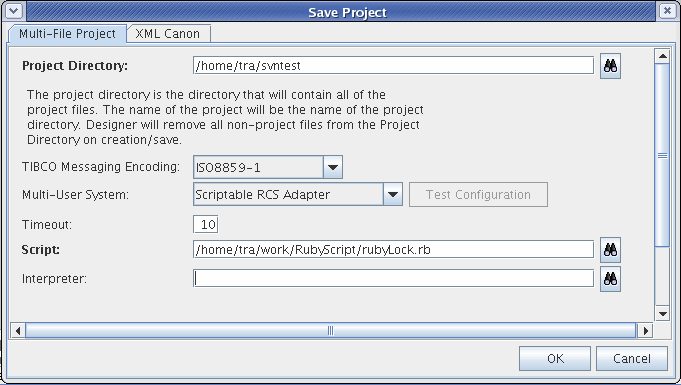
If you are working on Windows operating systems and do not use .bat or .exe as your script, you must provide the path to the tool used to implement your script or program in the Interpreter field. For example, C:\ruby\bin\ruby.exe.
Figure 27 Save Project Options for a Scriptable RCS Adapter
7.
Start using the SVN repository that you created by doing a checkout of the RCS Scriptable Adapter project. For example, execute the following command using a shell:
./svn checkout svn://localhost:9133/ /home/tra/svntest
8.
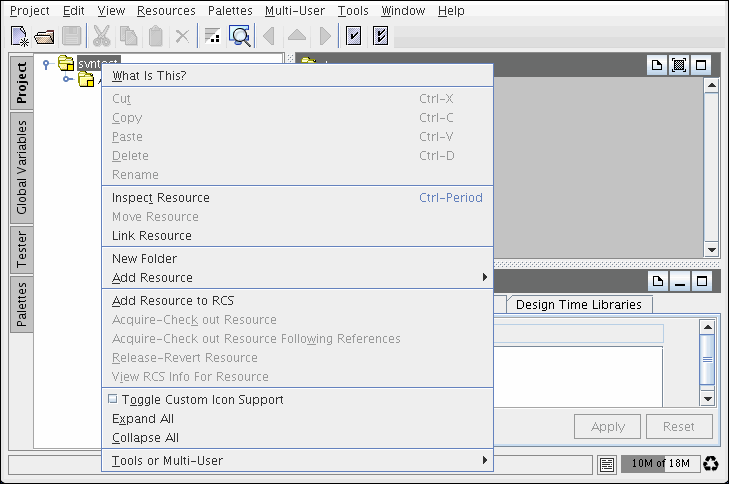
Select the Project root folder, right click and select Add Resource to RCS.
Figure 28 SVN Add Resource to RCS
9.
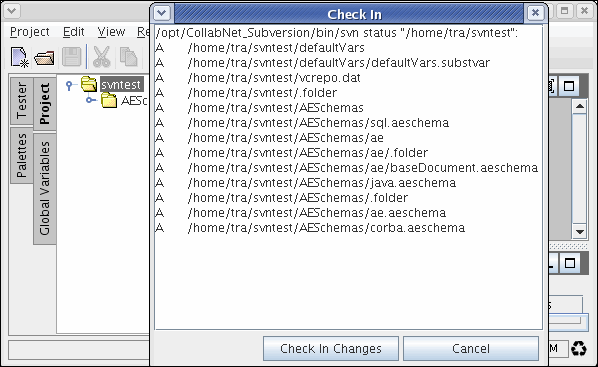
Select Multi-User > Check in Changes to check the project in SVN.
Figure 29 SVN Check In Dialog
To Modify a Scriptable RCS Adapter Project, follow these steps:
1.
2.
Modify the project, save it, then click Multi-User > Check In Changes.

Copyright © Cloud Software Group, Inc. All Rights Reserved