|
| Copyright © Cloud Software Group, Inc. All Rights Reserved |
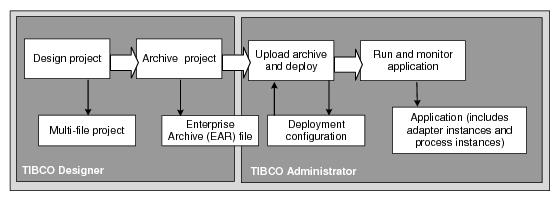
Figure 45 TIBCO Application Flow of InformationAn EAR file can contain local project resources, design-time library resources, and files as specified in AliasLibrary resources. In addition, the TIBCO Designer classpath may include references to other files that are included in the EAR file. The EAR file size may become an issue when you build it in TIBCO Designer, load it into TIBCO Administrator and deploy it to remote machines.An EAR file should only include resources that are required to deploy the project. Large archive files have negative impacts at deployment. If each application in you project uses different resources, different AliasLibrary resources should be used to support it (rather than one large AliasLibrary).
• TIBCO Designer displays a warning when you add a directory to an EAR file, or alias to an AliasLibrary that references a directory. The EAR file size is typically one fifth of the warning, due to file compression. The warning reminds you that when referencing a directory, all files and sub directories in the directory are archived.You can modify the following property in designer.tra so that the warning appears only when files of the given size are loaded. The value is in megabytes.
If the warning appears, you may need to increase the heap size value in designer.tra so TIBCO Designer has enough memory to manage the project. At deployment, TIBCO Administrator copies the EAR file and deployment files to remote machines. If the EAR file is large, copying files will take extra time.
|
| Copyright © Cloud Software Group, Inc. All Rights Reserved |