Copyright © Cloud Software Group, Inc. All Rights Reserved


Chapter 6 Creating an Archive for Deployment : Creating an Adapter Archive

Creating an Adapter Archive
If adapters are part of your project, you can create adapter archives and add them to the Enterprise archive. The following example uses a Generic Adapter Configuration. The process would be the same for an adapter.
To Add a Generic Adapter Configuration Archive
1.
2.
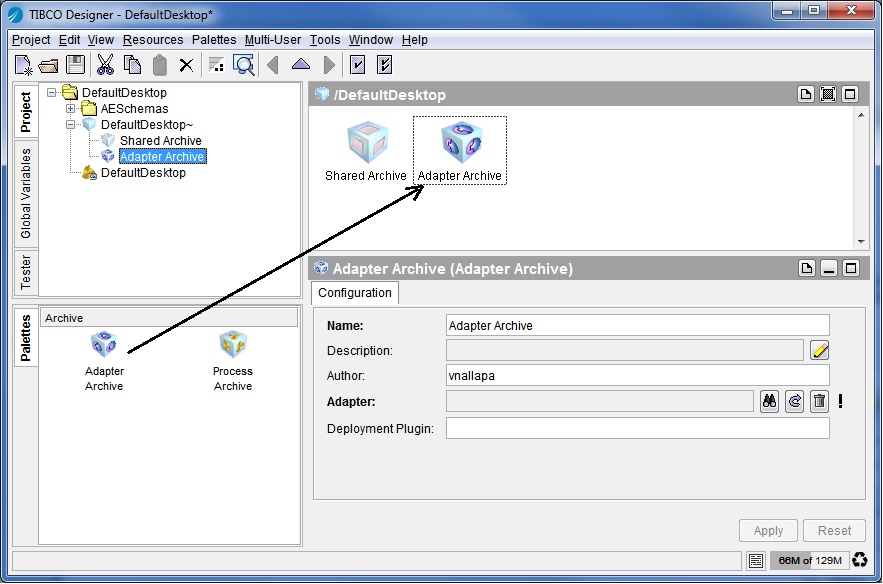
Select the Enterprise Archive resource in the project panel. If there are any configured adapters in your project, an Adapter Archive resource becomes available in the palette panel. If you’re working in palette mode, it is located in the adapter’s palette.
Figure 47 Adding an Adapter Archive to Your Enterprise Archive
3.
Drag the Adapter Archive into the design panel and specify information in the Configuration tab, then click Apply:
 
Name of the Adapter Archive.
Optional author of the Adapter Archive.
Deployment plugin class. This class must be an implementation of the com.tibco.tra.tsm.plugin.custom.CustomTSMPlugIn interface. TIBCO Administrator runs this code as part of the deployment process when it creates the .tra file.
In addition to providing a pointer to this class here, you must also add a .jar file to the Shared Archive that includes the class so the class will be in the classpath.
4.
After you have selected an adapter, the Advanced tab becomes available and you can optionally specify the following information, then click Apply.
The type of adapter. This corresponds to the extension of the adapter project file (multi-file projects). This field is only available for Generic Adapter Configuration or for adapters that allow multiple software choices, such as the TIBCO Adapter for Tuxedo. This value must match the value set by the software’s installer or specified when custom software was added to the administration domain.
Warning: Supplying a different version can have serious compatibility consequences.
5.
To build the archive, select the Enterprise Archive (which is one level higher in the project tree) and click the Build Archive button.

Copyright © Cloud Software Group, Inc. All Rights Reserved