Copyright © Cloud Software Group, Inc. All Rights Reserved


Chapter 6 Creating an Archive for Deployment : Creating a Process Archive

Creating a Process Archive
If one or more TIBCO ActiveMatrix BusinessWorks processes are part of your project, you can create process archives and add them to the Enterprise archive.
To Add a Process Archive
1.
2.
Select the Enterprise Archive resource in the project panel. If there are any processes that have process starters in your project, a Process Archive resource becomes available in the palette panel. If you’re working in palette mode, it is located in the Process palette.
 
3.
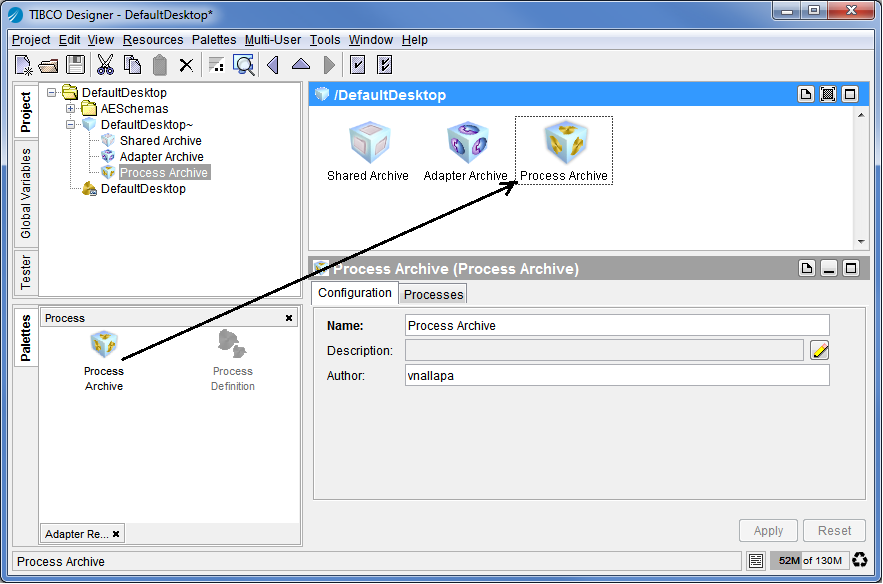
Drag the Process Archive into the design panel.
Figure 48 Adding a Process Archive to Your Enterprise Archive
4.
Specify information in the Configuration tab, then click Apply:
Name of the Process Archive.
Optional author of the Process Archive.
5.
Click the Processes tab to specify the process definition. To define the process:
a.
b.
c.
6.
Click Apply.
7.
To build the archive, select the Enterprise Archive (which is one level higher in the project tree) and click the Build Archive button.

Copyright © Cloud Software Group, Inc. All Rights Reserved