If you cut a complex resource (for example, a Folder or a
Generic Adapter Configuration), all resources inside it are also deleted and placed onto the clipboard.
If you copy a complex resource (for example, a Folder or a
Generic Adapter Configuration), all resources inside it are also placed onto the clipboard.
Displays the Find Resource dialog, which allows you to specify the resource name, category, and type.
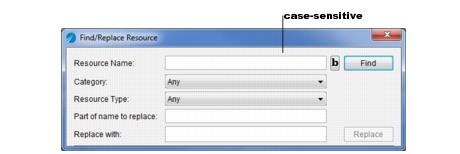
Displays the Find/Replace Resource dialog, which allows you to find resources and replace parts of their name.
If you click the b button, the find operation is case sensitive.
Allows you to set preferences for TIBCO Designer. Click Restore Default Settings at any time to return to the default TIBCO Designer settings. The next tables explain the settings under each tab.