Creating a Property File
You can create a property file with customized configurations other than the default demo.properties file.
- Procedure
-
Go to the
Filemenu and click New Property File. -
To configure the Property file, specify the values in the file.
-
To save the configuration of the Property file, click Save.
-
To analyze the logs, click Run Analyze
 .
.
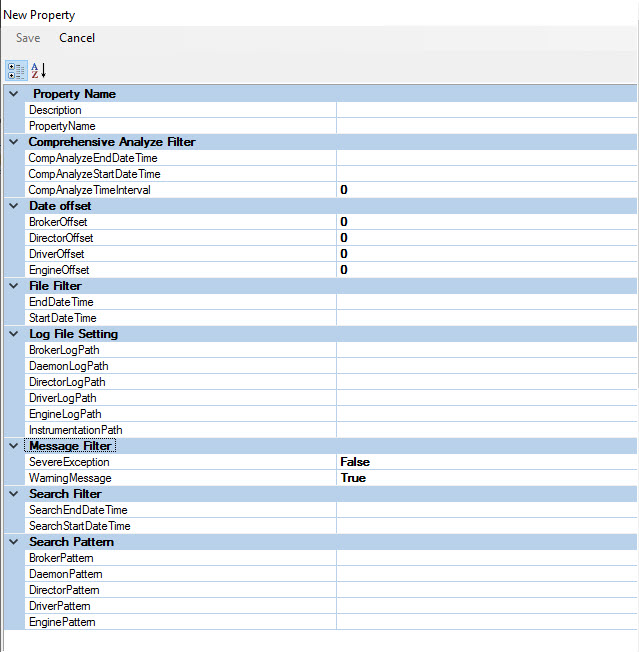
| Field | Sub-Fields | Description |
|---|---|---|
| Property Name | Property Name |
It specifies the name of the Property file. |
| Description | It gives the description of the Property file. It is mandatory and saved to the config directory. | |
| Comprehensive Analyze Filter | CompAnalyzeStartDate Time | It specifies the Start date and time for the Comprehensive Analyze. |
| CompAnalyzeEndDate Time | It specifies the Start date and time for the Comprehensive Analyze. | |
| CompAnalyzeTimeInterval | It specifies the time (in seconds) between the Start time and End time of the Comprehensive Analyze. | |
| Date Offset | Driver Offset | It specifies the offset(in hours) of the Driver log file. For example, if it is -1, one hour is reduced from the Driver log file. |
| Broker Offset | It specifies the offset (in hours) of the Broker log file. For example, if it is 2, two hours are added in the Broker log file. |
|
| Engine Offset | It specifies the offset (in hours) of the Engine log file. For example, if it is 2, two hours are added in the Engine log file. |
|
| Director Offset | It specifies the offset (in hours) of the Engine log file. For example, if it is 2, two hours are added in the Director log file. |
|
| File Filter | StartDate Time | It specifies the start date and time to parse the log files. |
| EndDate Time | It specifies the end date and time to parse the log files. | |
| Log Culture Name and Date Time Format | Log Date Time Format | It specifies the date and time format for the log file. |
| Log File Setting | DriverLogPath | It specifies the root path of the Driver Log file. |
| BrokerLogPath | It specifies the root path of the Broker Log file. | |
| DirectorLogPath | It specifies the root path of the Director Log file. | |
| DaemonLogPath | It specifies the root path of the Daemon Log file. | |
| EngineLogPath | It specifies the root path of the Engine Log file. | |
| InstrumentationPath | It specifies the file path of the Instrumentation Log file. | |
| Message Filter | Warning Message |
It specifies the boolean value, either True or False. |
| Severe Exception | It specifies to display only when there is a Severe error or an exception. | |
| Search Filter | Search StartDate Time | It specifies the start date and time to reanalyze the logs. |
| Search EndDate Time | It specifies the end date and time to reanalyze the logs. | |
| Search Pattern | Driver Pattern | It specifies the search pattern in the Driver log file. For example, driver*.log |
| Broker Pattern | It specifies the search pattern in the Broker log file. For example, gridserver.03.29.2022-*.log |
|
| Engine Pattern | It specifies the search pattern in the Engine log file. For example, engine-*.03.29.2022*.log |
|
| Daemon Pattern | It specifies the search pattern in the Daemon log file. For example, engine*.log |
|
| Director Pattern | It specifies the search pattern in the Director log file. For example, engine*.log |
Note: To abort the run, click Abort Analyze  .
.
.