Creating scripted REST services tutorial
Introduction to scripted REST services
A scripted REST service is the combination of a REST endpoint definition and its related script. Scripts handle programmatic actions for REST services and are written in the EBX® Script language. REST service definitions created in the EBX® Script IDE conform to a subset of the OpenAPI Specification (OAS). This allows you to import and export definitions that conform the OAS v3 standard.
During implementation use the options in the UI to define:
Paths
Operations
Path parameters
Query parameters
Body and Responses
Data types
Each REST service script can include multiple functions to handle logic for multiple endpoints and REST methods. After implementing and publishing the scripted REST service, it is accessible by an external consumer. Note that only JSON requests and responses are supported.
How this tutorial is organized
This tutorial shows how to create and publish scripted REST services in the EBX® Script IDE. It does not cover complex use cases, or all of the user interface options.
The parts that make up this tutorial are:
Prerequisites
Before beginning this tutorial take a moment to review the following:
Understanding the anatomy of a scripted REST service
There are 2 main components to a scripted REST service:
The REST API definition of the endpoint including components such as: paths, HTTP methods (GET, POST, PUT, DELETE), query parameters, access, and responses.
The script where functions are written with the programmatic logic to: query or update data, or validate business rules or constraints. The function type called by a REST service must be an EBX® Script export function.
Attention
The bridge between the REST API and script is the Operation id. You must use the same value for the function name in your script as for the Operation id property when defining the REST API. It's this Id that allows EBX® to know what function to call when an endpoint is accessed.
Whats next? create and publish the tutorial's data model.
Tutorial data model
To follow along, you can create the basic data model shown below:
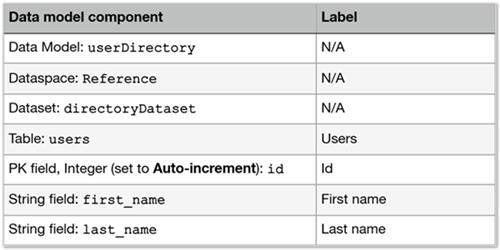
Whats next? create and test a scripted REST service.
Creating a scripted REST service
The goal of this scripted REST service is to create an endpoint and its related script that returns a list of user records from our Users table.
If the EBX® Script IDE perspective is not open, click the
 icon at the top right of the EBX® toolbar and select Script IDE.
In the Dock on the left of the screen locate and select REST service.
Click the + icon to create a new script and after providing a name, save the script.
Create the REST path and operation:
Select the API tab and create a new path.
Enter
/usersfor the Path template name and click to confirm.Note
Although not shown here, use curly brackets separated by forward slashes to add parameters. For example:
/somePath/{param1}/{param2}.Create a new operation under the GET tab.
Enter an Operation id, or optionally select Generate to automatically create an id. For this tutorial, we'll use the value
getUsers.Attention
The Operation id serves as the map between this endpoint and its corresponding script function.
Save the API.
Build a data type for the operation response:
Select the DATA TYPES tab.
Add a new Data type with the name
Person.Add the following properties that will be mapped to data model fields in the script:
Name:
id, Type: decimalName:
firstName, Type: stringName:
lastName, Type: string
Save the data type.
Add the data type to the REST response:
Open the API DEFINITION tab.
Expand the
/userspath.In the Responses group, choose
Personfrom the Type menu and tic the Is Array box.Save the API.
Create the script:
On the right side of the Operation id field, click the SCRIPT button to automatically generate a function template with the same name as the operation id.
The generated function is shown below:
export function getUsers(): rest_response
begin
//Replace the following code with your implementation.

  var object1 := instanceOf<User>();
  //Set object1 properties.
  var object2 := instanceOf<User>();
  //Set object2 properties.

  var content := list.of(object1, object2);
  return rest.responseOf(200, content);
end
Before writing the logic for our function, create helper methods to retrieve the dataspace and dataset where we want this script to run. Note that in the following example, you'll need to provide the names of your dataspace and dataset, if different from
ReferenceanduserDirectory, respectively:uses core.data as data; //Helpers to retrieve a specific dataspace and data set function getDirectoryDataspace(): dataspace begin return data.findDataspace('Reference'); end function getDirectoryDataset(dataspace: dataspace): dataset begin return data.findDataset(dataspace, 'userDirectory'); endWrite a script to handle the service's business logic.
The following sample is annotated to describe the function's implementation:
//Import core units
//The core.rest unit methods are used in REST services
uses core.rest as rest;
//The core.list unit methods enable creating and updating lists
//We need this as the return type we specified requires an Array
uses core.list as list;
//The core.data unit provides database CRUD operations
uses core.data as data;

//Create a model reference
//Be sure to supply your model's name, ours is "userDirectory"
references model "userDirectory" as dir;

export function getUsers(): rest_response
begin
    //Set the dataset location using the helper methods
	const directory := getDirectoryDataset(getDirectoryDataspace());

    //Create the SQL query to retrieve the desired response data
    //Be sure to use the correct field and table names defined in your data model
	var query := sql `select u.id, u.firstName, u.lastName from dir."users" u order by u.id`;
    //Add the dataset to the query
	data.addDataset(query, 'dir', directory);

    //Create a list for the 'Person' data type
	var listOfUsers := list.of<Person>();

    //Create a variable to store the query result
	var queryResult := data.executeQuery(query);
    //Loop over, and add query results to the 'listOfUsers'
	for tuple in queryResult do
	begin
        //Create an Object of type 'Person'
		var user := instanceOf<Person>();
        //Map each Object property with the corresponding query result
		user.id := tuple.id;
		user.firstName := tuple.firstName;
		user.lastName := tuple.lastName;

        //Add each user to the list
		list.add(listOfUsers, user);
	end;

    //Return the optional REST response code and the list of users
	return rest.responseOf(200, listOfUsers);
end
Save the script. The IDE automatically checks for any compilation errors and will display them in the Messages section below the script.
If no errors are found, select PUBLISH.
Test the service using the Script IDE's built-in testing capabilities. Alternatively, you can test using a tool such as Postman:
In the upper-right click TEST API.
Select the API to test,
usersin our case.Click Test Request and then Send in next screen that displays.
As shown below, the response Body should include all records in the users table:
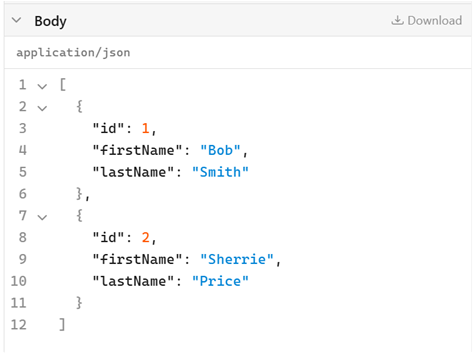
Whats next? Build on what you've learned in the tutorial by creating additional scripted CRUD operations.
Example scripted REST services for CRUD operations
This section contains examples of scripted REST services for various CRUD operations. Each example includes the path, REST methods, operation ids, and data types used. The samples build on the above tutorial and are meant to demonstrate how to implement some common uses cases. Be sure to review the Examples prerequisites before testing these examples.
Examples prerequisites
If you want to use these examples with your existing data, you'll need to update the sample code with the appropriate data model, dataspace, and dataset information. To use the sample code as it is set up your environment as follows:
Data model
The sample code is based on the same data model used in the tutorial. This is reflected in any referenced data model component naming in the code samples.
Data types
Ensure you have the following types create under the DATA TYPES tab:
Data types | Properties |
|---|---|
Person |
|
Error |
|
Shared code template
The following code is required for all of the following examples. It includes required core units, data model reference, and two helper functions. Later examples reference this template and show only the code that is specific to each operation.
//Required core units
uses core.rest as rest;
uses core.list as list;
uses core.data as data;
uses core.complex as cp;

//Specifies the data model as 'userDirectory'
references model "userDirectory" as dir;


//Helper to retrieve the 'Reference' dataspace
function getDirectoryDataspace(): dataspace
begin
	return data.findDataspace('Reference');
end

//Helper to retrieve the 'directoryDataset' dataset
function getDirectoryDataset(dataspace: dataspace): dataset
begin
	return data.findDataset(dataspace, 'directoryDataset');
end
Create a user
Use the following API definition and script to create a user.
API definition
Path |
|
Path parameters | N/A |
REST Method | POST |
Operation id: |
|
Query parameter | N/A |
Body | Type: Required: |
Responses: | Type: |
Script
The following script includes 2 functions, 1 procedure, and does the following:
Checks whether the user specified in the request Body exists.
If the user does not exist, the user is created in the database.
If the user does exist, an error message is returned. No data is updated.
export function createUser(const user: Person): rest_response
begin
	ref response: rest_response;

	execute transaction tr on getDirectoryDataspace() as system
	begin
		response := doCreateUser(tr, user);
	end

	return response;
end

function doCreateUser(tr: transaction, user: Person): rest_response
begin

	const directory := getDirectoryDataset(tr.dataspace);
	const table := data.findTable<dir.users>(directory);

	var pk := cp.primaryKeyOf<dir.users>();
	pk.id := user.id;

	var record := data.lookupRecord(table, pk);
	if isNotNull(record) then
	begin
		var error := instanceOf < Error > ();
		error.message := 'User "' | user.id | '" already exists';
		return rest.responseOf(400, error);
	end

	tr.isAllPrivileges := true;
	createOrUpdateUser(tr, user.id, user.firstName, user.lastName);

	return rest.responseOf(201, user);
end

procedure createOrUpdateUser(tr: transaction, id: int, firstName: string, lastName: string)
begin
	const directory := getDirectoryDataset(tr.dataspace);
	const table := data.findTable<dir.users>(directory);

	var pk := cp.primaryKeyOf<dir.users>();
	pk.id := id;
	var user := data.lookupRecordForUpdate(tr, table, pk);
	if isNull(user) then
	begin
		user := data.recordOf(tr, table);
		user.id := id;
	end

	user.firstName := firstName;
	user.lastName := lastName;
	data.saveRecord(user);
end
Getting a user by id
Use the following API definition and script to return a user using their id.
API definition
Path |
|
Path parameters | Name: id Type: integer |
REST Method | GET |
Operation id: |
|
Responses: | Type: Is Array: checked |
Script
The following script queries the database for a user, and returns an error message if that user is not found.
export function getUser(id: int): rest_response
begin
	const directory := getDirectoryDataset(getDirectoryDataspace());

	var query := sql `select u.id, u.firstName, u.lastName from dir."users" u where u.id = ?`;
	data.addDataset(query, 'dir', directory);
	data.setParameter(query, 0, id);

	var tuple := data.fetchOne(query);
	if isNull(tuple) then
	begin
		var error := instanceOf <Error>();
		error.message := 'User not found';
		return rest.responseOf(404, error);
	end

	var user := instanceOf<Person>();
	user.id := tuple.id;
	user.firstName := tuple.firstName;
	user.lastName := tuple.lastName;

	return rest.responseOf(200, user);
end
Update a user
Use the following API definition and script to update a user.
API definition
Path |
|
Path parameters | N/A |
REST Method | PUT |
Operation id: |
|
Query parameter | N/A |
Body | Type: Required: |
Responses: | None. Check No Response Body |
Script
The following script includes 2 functions and does the following:
Checks if the user specified in the request Body exists.
If the user does not exist, an error is returned. No data is updated.
If the user does exist, their record is updated with the supplied data.
export function updateUser(const user: Person): rest_response
begin
	ref response: rest_response;

	execute transaction tr on getDirectoryDataspace() as system
	begin
		response := doUpdateUser(tr, user);

	end

	return response;
end

function doUpdateUser(tr: transaction, user: Person): rest_response
begin
	const directory := getDirectoryDataset(tr.dataspace);
	const table := data.findTable<dir.users>(directory);

	var pk := cp.primaryKeyOf<dir.users>();
	pk.id := user.id;

	var record := data.lookupRecordForUpdate(tr, table, pk);
	if isNull(record) then
	begin
		var error := instanceOf < Error > ();
		error.message := 'User "' | user.id | '" not found';
		return rest.responseOf(404, error);
	end

	record.firstName := user.firstName;
	record.lastName := user.lastName;
	data.saveRecord(record);

	return rest.responseOf(200, user);
end
Deleting a user by id
Use the following API definition and script to delete a user using their id.
API definition
Path |
|
Path parameters | Name: id Type: integer |
REST Method | DELETE |
Operation id: |
|
Responses: | No Response Body: checked |
Script
The following script queries the database for a user, and deletes them if the user is found.
export function deleteUser(const id: int): rest_response
begin
	execute transaction tr on getDirectoryDataspace() as system
	begin
		const directory := getDirectoryDataset(tr.dataspace);
		const table := data.findTable<dir.users>(directory);

		var pk := cp.primaryKeyOf<dir.users>();
		pk.id := id;

		var record := data.lookupRecord(table, pk);
		if isNotNull(record) then
		begin
			data.deleteRecord(tr, record);
		end
	end

	return rest.emptyResponse(204);
end