Adding Realms
You can add LDAP realms to the TIBCO Enterprise Administrator server. The default realm available is TEA_DB.
Procedure
-
Click
 and select
User Management.
and select
User Management.
The User Management pane is displayed.
-
Under Users, click
Realms.
The Realms pane is displayed.
-
Click
Add.
The Register New Realm is displayed.
-
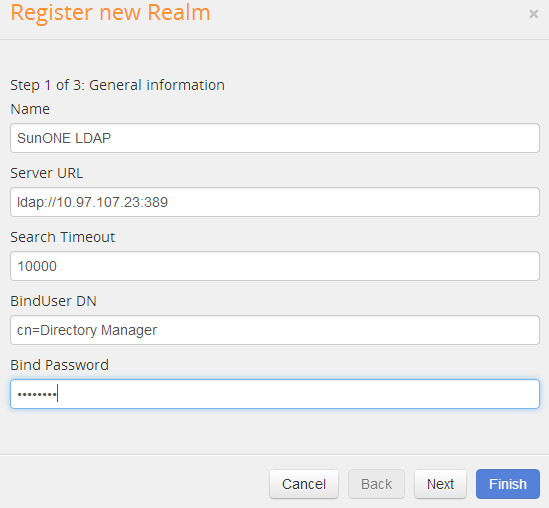
Provide the following general information:
- Name
- Server URL
- Search Timeout
- BindUserDN
- Bind Password
Adding a Realm: General Information
-
Click
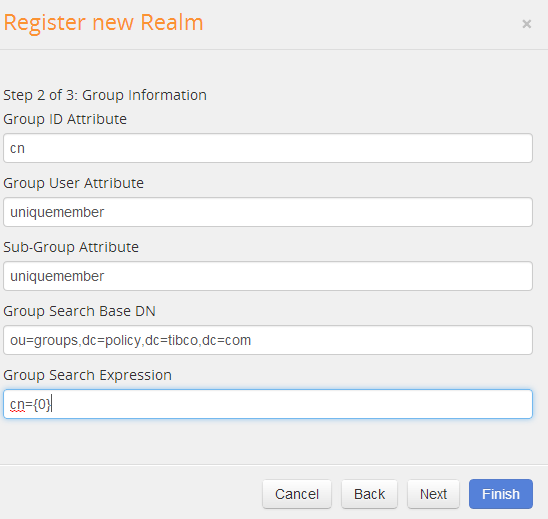
Next. Provide the following group information:
- Group ID Attribute
- Group User Attribute
- Sub-Group Attribute
- Group Search Base DN
- Group Search Expresssion
Adding a Realm: Group Information
-
Click
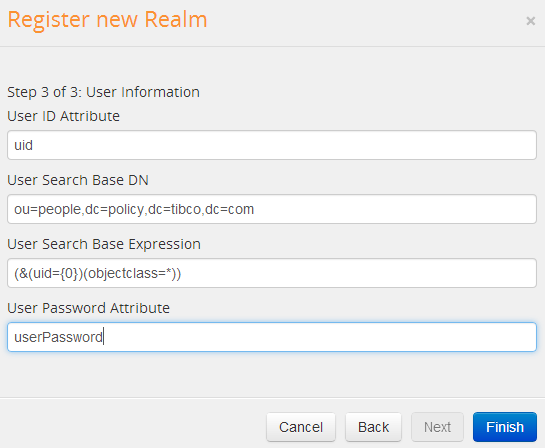
Next. Provide the following User information:
- User ID Attribute
- User Search Base DN
- User Search Base Expresssion
- User Password Attribute
Adding a Realm: User Information
-
Click
Finish.
Result
The realm is added to the TIBCO Enterprise Administrator server.
Copyright © Cloud Software Group, Inc. All Rights Reserved.