Building Flogo Applications Offline
This procedure describes how to build Flogo applications on a system with restricted or no Internet access.
Ensure that you have the following setup:
-
A machine with an Internet connection to download all Flogo dependencies once.
-
This internet-connected machine must have access to the following:
proxy.golang.org,index.golang.org, andsum.golang.org. -
The internet-connected machine must have the following installations:
-
Golang (refer to https://go.dev/doc/install for installation instructions)
-
Visual Studio Code
-
TIBCO Flogo® Extension for Visual Studio Code
-
Perform the following steps on a machine with an active Internet connection:
- Procedure
-
Create a master Flogo app.
Note: This app only needs to compile successfully. It does not need to execute at runtime so accurate mappings are not required. -
You must include the following in this app:
-
All triggers, activities, and connections from connectors you plan to use in development.
-
All functions you intend to use.
-
Any custom extensions.
-
-
Run the command
go env GOMODCACHEfrom your terminal or command prompt to find your go mod cache location. -
Delete the folder specified in the output of the
go env GOMODCACHEcommand. -
Build the master Flogo app in Visual Studio Code or using the Flogo Build CLI.
-
Verify that the application builds successfully.
-
Check the go mod folder again. It now contains a
<Go Mod Path>/cache/downloadfolder. -
Compress the folder to move it or copy it directly to the machine without Internet access.
Perform these steps on a machine where Internet access is restricted or unavailable:
- Procedure
-
Copy the go mod cache folder (from the internet-connected machine referenced in the previous procedure) to the offline machine.
-
On this machine, add a new system environment variable FLOGO_MOD_CACHE.
-
Set the value of FLOGO_MOD_CACHE to the path where you copied the go mod cache folder.
-
For example, if you copy the folder to
C:\Store\FlogoGoCache, set FLOGO_MOD_CACHE toC:\Store\FlogoGoCache.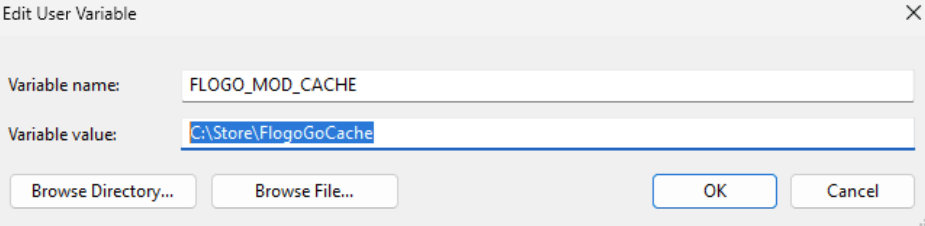
-
-
Perform your builds on this machine. The system uses dependencies from the specified cache folder and does not attempt to pull new dependencies from the Internet.