Using Web Display Format: HTML
You can display a report as an HTML page. HTML supports most style sheet options (especially when used with an internal cascading style sheet), allowing for full report formatting.
By default, leading and internal blanks are compressed on the report output. For information on preserving them, see Preserving Leading and Internal Blanks in Report Output.
Usage Notes for HTML Report Output
- The default behavior for HTML format when borders are turned on is to display column titles without the underline. To display column titles with underlines when borders are on, set GRID OFF.
- The AUTOFIT parameter automatically resizes the HTML report output
to fit the container (window or frame). For procedures that contain
multiple report outputs, if AUTOFIT is set to ON in any of the report
output procedures, the setting will apply to all report output on
the page.
AUTOFIT is supported using the Accordion, On-Demand Paging, HTML TOC, and HFREEZE interactive reporting features.
For more information on the AUTOFIT parameter, see the ibi™ WebFOCUS® Developing Reporting Applications manual.
Creating HTML Reports With Absolute Positioning
Format DHTML provides HTML output that has most of the features normally associated with output formatted for printing such as PDF or PostScript output. You can create an HTML file (.htm) or a Web Archive file (.mht). The type of output file produced is controlled by the value of the HTMLARCHIVE parameter.
Some of the features supported by format DHTML are:
- Absolute positioning. DHTML precisely places text and images inside an HTML report, allowing you to use the same StyleSheet syntax to lay out HTML as you use for PDF or PS output.
- On demand paging. On demand paging is available with SET HTMLARCHIVE=OFF.
- PDF StyleSheet features. For example, the following features are supported: grids, background colors, OVER.
Create Web Archive Report Output
SET HTMLARCHIVE = {ON|OFF}
where:
Creates output in Web Archive format. The file type of the output file is MHT.
Creates output in HTML format. The file type of the output file is HTM. OFF is the default value.
Create a DHTML Report
[ON TABLE] HOLD [AS name] FORMAT DHTML
where:
Specifies the name of the output file. The extension will be HTML if SET HTMLARCHIVE is OFF or MHT if SET HTMLARCHIVE is ON.
Usage Notes for Format DHTML
- The font map file for DHTML reports is member DHTML in the ERRORS data set.
- Legacy compound reports are not supported.
Creating a DHTML Report
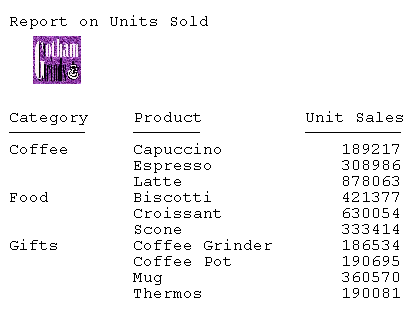
The following example creates a DHTML file that has an image with absolute positioning:
SET HTMLARCHIVE = OFF
TABLE FILE GGSALES
SUM UNITS BY CATEGORY BY PRODUCT
ON TABLE SUBHEAD
"Report on Units Sold"
" "
" "
" "
" "
" "
ON TABLE SET PAGE-NUM OFF
ON TABLE HOLD FORMAT DHTML
ON TABLE SET STYLE *
TYPE=TABHEADING,IMAGE=c:\images\GOTHAM.GIF, POSITION=(.25 .25),
 SIZE=(.5 .5), $
ENDSTYLE
END
The output shows that the look and positioning are the same as they would be for a PDF report: